Home › Blog › How to Make a Festival Greeting Video in Hindi
How to Make a Festival Greeting Video in Hindi
Last updated: November 13, 2026
This article explains how to make a festival greeting video in Hindi using Diya, from switching the app language to typing the wish and sharing it on WhatsApp Status.
Published
Quick answer
Here's how to make a festival greeting video in Hindi: open Diya, switch the app language to Hindi, pick a festival template, add photos, type your wish in Hindi, and save — ready in about 3 minutes.
Key takeaways
- Switch Diya's language to Hindi in settings — templates, menus and name art all follow.
- Pick any festival template — Diwali, Chhath, Bhai Dooj, Holi, Eid or Navratri — and type your wish in Hindi.
- Use your phone's Hindi keyboard; Diya does not translate your wish for you.
- Free: first 2 videos free, then 1 free video a day in 720p with a small Diya mark; Premium removes it.
- Works the same on Android and iPhone, with the full app available in 11 Indian languages.
Here's how to make a festival greeting video in Hindi: switch Diya's language to Hindi, pick a festival template, add your photos, and type your wish in Hindi — the finished video is ready in about 3 minutes.
How do you make a festival greeting video in Hindi, step by step?
Diya's menus switch to Hindi the moment you pick Hindi from the language list, and the rest of the process stays exactly the same as making any other Diya video — template, photos, text, music, save.
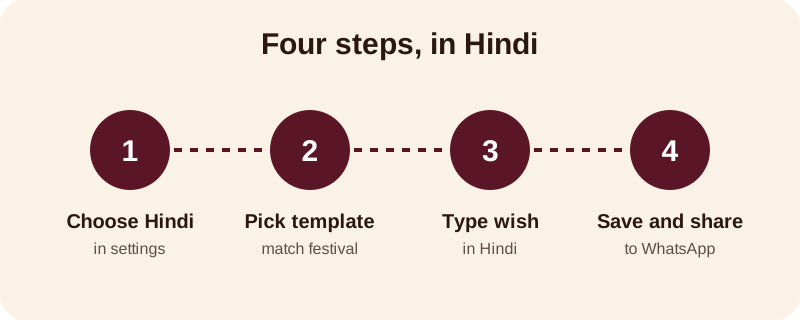
- Open Diya and go to the language setting, then choose Hindi from the full list of 11 Indian languages.
- Pick a festival template that fits the occasion, such as Diwali, Chhath, Bhai Dooj, Holi, Eid or Navratri.
- Add four to eight photos for the festival and put them in the order you want them to appear.
- Tap on the text and type your wish in Hindi, replacing the sample line the template starts with.
- If you want a name on screen, use name art to turn it into glowing Hindi lettering.
- Keep the template's song or choose one from the free music library; beat-sync changes the photos on the beat for you.
- Save the video and share it as a WhatsApp status video in Hindi, straight from the app.
Grandparents and relatives often read Hindi more comfortably than English, so a wish written in Hindi can feel warmer and closer to home. You are not changing the festival template, the photos or the music — only the language of the menus and the words on screen.
Which festivals can you make a Hindi greeting video for?
You can make a Hindi wishes video for any festival template Diya offers — Diwali, Chhath Puja, Bhai Dooj, Holi, Eid, Navratri and more. The Hindi wish sits on top of whichever template matches your festival and your photos; you are only changing the text, and the music stays yours to pick.
Pick photos that already carry the festival's feeling — rangoli and diyas for Diwali, the ghat at sunrise for Chhath Puja, a tilak photo for Bhai Dooj, colour on hands and faces for Holi, garba shots for Navratri, and a family meal for Eid. Making a festival video in Hindi works the same way for every one of these occasions; you are only changing the words on screen, never the mood of the template.
A few starting points, if you want festival-specific ideas before you open the app:
| Festival | Where to start |
|---|---|
| Diwali | Diwali status video templates |
| Chhath Puja | Chhath Puja status video templates |
| Bhai Dooj | Bhai Dooj status video templates |
| Holi | Holi status video guide |
| Eid | Eid Mubarak status video guide |
| Raksha Bandhan | Raksha Bandhan video for brother guide |
| Ganesh Chaturthi | Ganesh Chaturthi status video guide |
Diya's festival calendar reminds you a day or two before each festival, so you are not opening the app in a rush on the day itself. See the full festival status videos calendar for every festival Diya covers across the year.
Does a Hindi festival video work the same on Android and iPhone?
Yes — Diya works the same way on Android and iPhone, so switching to Hindi, picking a template and typing your wish behaves the same whichever phone you use. Download Diya from Google Play on Android or the App Store on iPhone; the Hindi language option is there from the very first time you open it, and there is no account needed to start.
In practice, Diya behaves like a Hindi language video maker app because every part of the experience — menus, sample wishes, name art and templates — can run in Hindi from start to finish, not just the final line of text on screen.
What should you write in a Hindi wish?
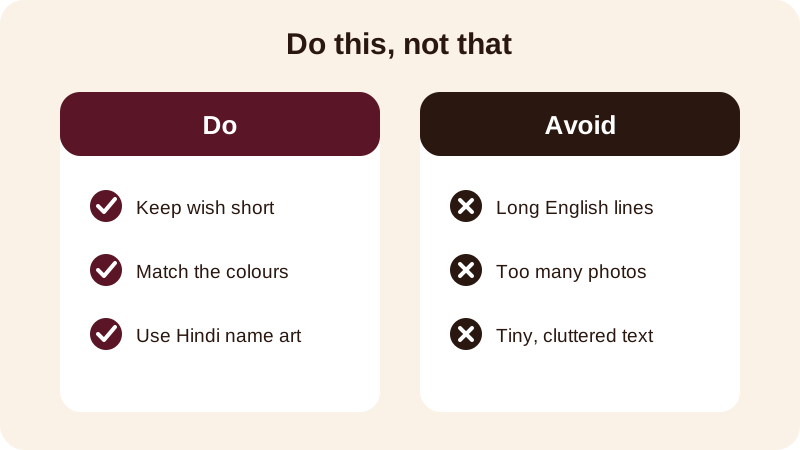
Short and warm beats long and formal, in a Hindi wishes video just as much as in English. One line that names the festival and adds a blessing is easier to read on a phone than three lines of text.
- दीपावली की हार्दिक शुभकामनाएं — Happy Diwali, from our home to yours
- भाई दूज की शुभकामनाएं, भैया — Happy Bhai Dooj, brother
- होली की ढेर सारी शुभकामनाएं — Wishing you a colourful Holi
- ईद मुबारक हो — Eid Mubarak to you and your family
- छठ पूजा की शुभकामनाएं — Chhath Puja wishes to the whole family
Add a name under the wish with name art if the video is for one person — a parent, a sibling, or a friend far from home — so it feels made for them rather than sent to everyone.
The same idea works for a birthday or anniversary greeting in Hindi. Pick a birthday or anniversary template, type the wish in Hindi, and add the name in name art if you want it to stand out.
What do you get for free, and what needs Premium?
Your first 2 videos in Diya are free, then you get 1 free video every day, in 720p, with a small "Diya" mark and a short "Made with Diya" end card — this is the same whether you are using the app in Hindi or in any other language.
Premium removes the mark and the end card, unlocks premium templates, and exports in Full HD 1080p, with 4K available on Android. Premium comes as Lifetime, Monthly or Annual, and there are no ads either way — Free or Premium.
None of this changes between languages — the free limits, the Premium features, and the fact that photos are made into the video on your phone and never uploaded stay the same whether the app is set to Hindi or to any other of the 11 Indian languages Diya offers.
Once you've made one Hindi greeting video, the rest go faster — you already know where the language setting, the templates and name art are. Save the finished video to your phone first, then share it wherever you like. Browse more festival video guides on the blog, or go back to the Diya home page to see every template the app offers.
Frequently asked questions
Can I type a Hindi wish even if the app's language is set to English?
Yes. The app's language setting changes menus and sample text, but the wish box always accepts whatever you type. You can leave Diya in English and still type your wish in Hindi using your phone's Hindi keyboard — switching the app language to Hindi just makes the whole experience, including sample wishes, match what you are typing.
Does Diya translate my wish into Hindi automatically?
No. Diya does not translate text for you. You need to type the wish yourself in Hindi, using your phone's own Hindi keyboard, then add it to the template like any other text. This keeps the wording exactly the way you want it, with no translation mistakes.
Which festivals can I make a Hindi greeting video for?
Any festival template Diya offers works with a Hindi wish — Diwali, Chhath Puja, Bhai Dooj, Holi, Eid, Navratri, Ganesh Chaturthi, Raksha Bandhan and more. You simply pick the template that matches the occasion, add your photos, and type the wish in Hindi instead of English.
Do I need Premium to make a Hindi greeting video?
No. Your first 2 videos are free, then you get 1 free video every day in 720p with a small Diya mark and end card. Premium removes the mark, unlocks premium templates and Full HD or 4K export on Android, but it is optional either way.
Will the Hindi text look right on every phone?
Diya works the same on Android and iPhone, so a Hindi wish you type shows up the same way on the finished video regardless of which phone made it or which phone plays it back, since the video itself is saved as a normal video file.