Home › Blog › Holi Status Video: Easy Guide
Holi Status Video: Easy Guide
Last updated: November 2, 2026
A step-by-step guide to making a short, colourful Holi status video in Diya using a template, a few photos, a wish and music.
Published
Quick answer
The quickest way to make a Holi status video is to pick a Holi template in Diya, add your colour-play photos, type a wish, and share the finished 9:16 video to WhatsApp Status in about 3 minutes.
Key takeaways
- Pick a Holi template, add 4-6 photos, type a short wish, and Diya makes a 9:16 video in about 3 minutes.
- Beat-sync changes photos on the beat of the song automatically, no timing needed.
- Add name art to put a name on the video for a personal Holi wish.
- First 2 videos are free, then 1 free video every day in 720p with a small Diya mark.
- A festival calendar reminds you before Holi so you're not rushing at the last minute.
The quickest way to make a Holi status video is to pick a Holi template in Diya, add your colour-play photos, type a short wish, and let the app put it all together with music in about 3 minutes.
What makes a good Holi status video?
A good Holi status video is short, colourful and easy to read on a small screen. Think of it as one bright burst of the day's joy — four to six photos, a short wish, and a song that matches the mood — rather than a long record of every moment.
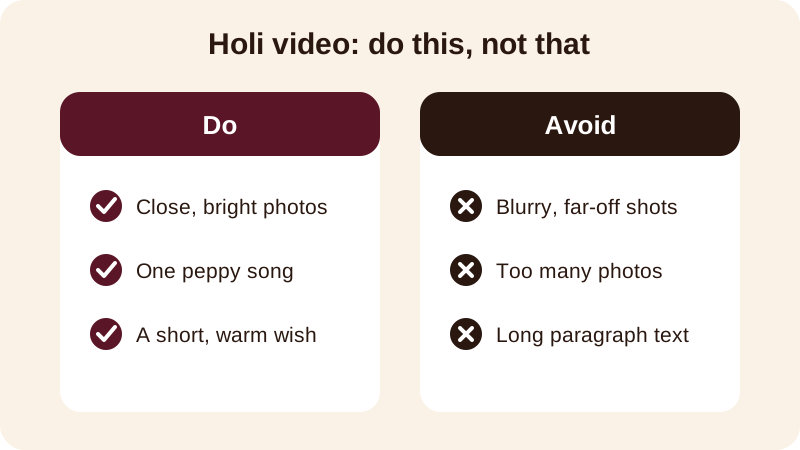
Your opening photo matters most. On a feed, people decide in a second whether to watch, so start with a close, sharp, colourful photo rather than a wide shot taken from far away. If you have a song in mind already, pick it before you choose the final photo order — a fast, dhol-heavy song suits quick colour-throw shots, while a softer song suits a slower sequence of family portraits.
How do you make a Holi status video in Diya?
Once you have your photos picked out, making the video itself takes only a few taps.
- Open Diya and choose a Holi template from the festival templates.
- Add four to six photos from your gallery and arrange them in order.
- Type your wish, and add your name or a family member's name as name art if you want.
- Keep the template's song or swap in another track from the free music library, or use your own song.
- Save the video and share it straight to WhatsApp Status.
Beat-sync is already switched on, so the photos change on the beat of the song by themselves — you don't have to time any of the cuts. If your wish has more than one line, lyrics mode can show it one line at a time instead of as one crowded block of text.
Everything happens on your phone — photos are made into video on your phone and never uploaded, and there's no account needed to get started. That also means you can make a Holi status video with song even with patchy internet, since nothing needs to upload or download while you edit.
Before you tap share, watch the finished video once from start to end on your own screen. Check that the wish is spelled correctly, that the photo order reads the way you want it to, and that the song doesn't cut off awkwardly right before the end. A thirty-second check now saves you from sending a status with a typo to the whole family.
Which photos work best for Holi?
Mix a couple of moments from before the colours start with a couple from the middle of the celebration, so the video shows both the people and the fun.
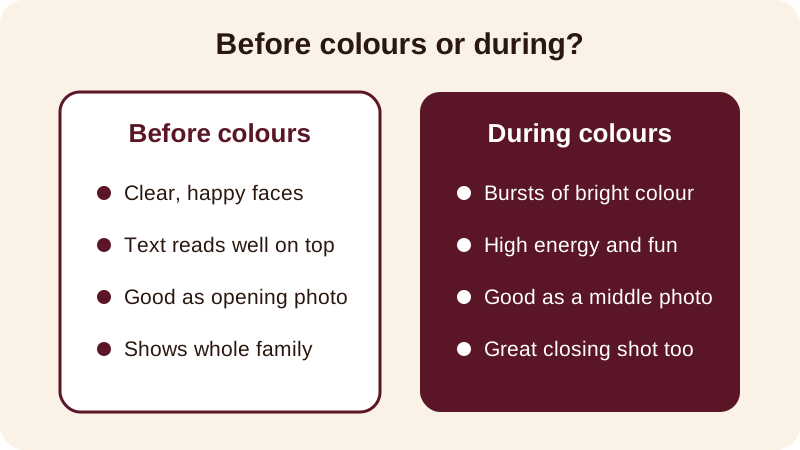
Avoid photos where faces are tiny in a big crowd — on a phone screen, a close shot of two or three people always reads better than a wide shot of twenty. If a photo got coloured powder on the lens, it still works well as a background shot, since a little blur in the middle of the video reads as playful rather than as a mistake.
If you were out with friends in the morning and with family in the afternoon, don't try to fit both groups into every photo. Pick the single clearest shot from each part of the day — one with friends, one with parents, one with children if there are any — so each face gets its own moment instead of being lost in a crowd shot.
What should you write in a Holi wish?
Keep the words on screen short — one line is easy to read in a few seconds, three lines are not. A few lines that work well for a Holi video with name:
- Happy Holi from the [Family Name] family — may your year be as colourful as today
- Rang barse, dil khushiyon se bhare — Happy Holi!
- Wishing you a safe and joyful Holi, filled with colours and laughter
- Happy Holi, [Name] — thinking of you on this colourful day
- Gulal, gujiya aur apna saath — iससे bada Holi gift kya hoga
- May every colour today bring you health, laughter and good news
Replace the bracketed parts with your own family name or the name of the person you are sending it to. If it's for one person who is far from home this Holi, put their name in the wish instead of yours, and keep the message warm rather than formal. Mixing a Hindi line with an English line is fine too — many families naturally write "Happy Holi" and follow it with a line in Hindi, since that's how they'd say it out loud.
Can you share the same Holi video on Instagram too?
Yes — since every Diya video is already 9:16, the same file you save for WhatsApp Status works for Instagram without any resizing. You don't need to crop the top or bottom, and you don't need a separate version for each app.
If you're curious why the vertical shape fits so well, this guide on Instagram Reels orientation explains why 9:16 is the shape every phone feed is built around. And if family abroad watch your Holi video on a shorts feed instead of a status, the same 9:16 file works there too — see best video size for YouTube Shorts for more on that.
What does the free version of Diya include?
Your first 2 videos in Diya are free, and after that you get 1 free video every day, saved in 720p with a small "Diya" mark and a short "Made with Diya" end card. There are no ads either way, Free or Premium. If you want your Holi status video without the mark and end card, or in 1080p — up to 4K on Android — Premium (Lifetime, Monthly or Annual) unlocks that along with more templates.
Diya works on Android and iPhone, is available on Google Play and the App Store, and runs in 11 languages, so you can type your wish in the language your family reads most comfortably. A festival calendar in the app reminds you a few days ahead, so you're not scrambling to pick photos at the last minute. For every vertical video you share, 9:16 is the right shape for WhatsApp Status and Instagram. If you also want to carry the same colours into other festivals this year, check the festival status videos calendar, or browse how to add background music to photos for more on picking the right song.
Frequently asked questions
How do I make a Holi status video on my phone?
Open Diya, pick a Holi template, add four to six of your colour-play photos, type a short wish or name, and save the video. Diya puts the photos and music together into a vertical video in about 3 minutes, ready to share straight to WhatsApp Status.
Can I put a name on my Holi status video?
Yes. Diya's name art turns a typed name into decorated lettering, so you can open the video with your name or a family member's name before the wish and photos play. It works well for personal status videos and group family wishes alike.
What music should I use for a Holi video?
Pick a peppy song from Diya's free music library, or use your own song from your phone. Beat-sync changes your photos on the beat automatically, so the slideshow feels lively without you timing anything yourself.
Is the Holi status video free to make?
Your first 2 videos in Diya are free, then you get 1 free video every day, saved in 720p with a small "Diya" mark and a short "Made with Diya" end card. Premium removes the mark and end card and unlocks 1080p, with 4K on Android.
What size should a Holi status video be?
Every video Diya makes is 9:16, the vertical shape WhatsApp Status, Instagram and most phone screens use. You don't need to crop or resize anything — pick your photos and the video comes out ready to post.