Home › Blog › Eid Mubarak Status Video: Easy Guide
Eid Mubarak Status Video: Easy Guide
Last updated: November 10, 2026
A step-by-step guide to making an Eid Mubarak status video with photos, a wish and music using Diya, ready for WhatsApp Status.
Published
Quick answer
To make an Eid Mubarak status video, pick an Eid template in Diya, add 3 to 6 photos, type your wish and name, and let the app add music — ready for WhatsApp Status in about 3 minutes.
Key takeaways
- Pick an Eid template, add photos, type your wish, and the video is ready in about 3 minutes
- 3 to 6 bright, close photos work better than a long, dark set of group shots
- Add a name as glowing name art so the wish feels made for one person
- Free videos carry a small Diya mark; Premium removes it and unlocks Full HD
- Choose the template's song, the free music library or your own track from your phone
The quickest way to make an Eid Mubarak status video is to pick an Eid template in Diya, add a few photos from your celebration, type your wish and let the app add the music — the whole video comes together in about 3 minutes. You don't need any editing skills, and the finished clip is sized for WhatsApp Status.
How do you make an Eid Mubarak status video?
Making an Eid Mubarak video with Diya is really four small jobs — pick a template, add your photos, type your wish, and share. Anyone in the family can do this on their own phone without any practice.
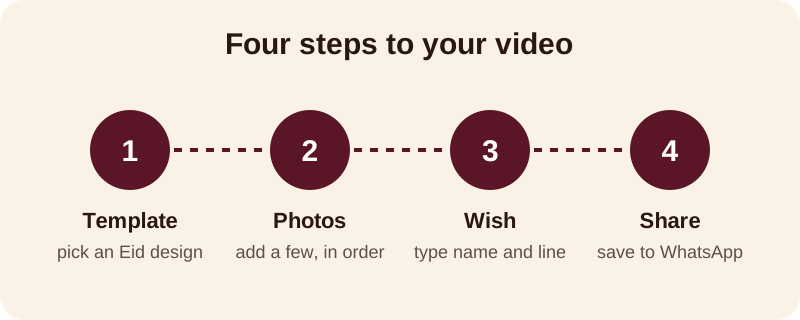
Here is the fuller version of those same four jobs, written out as a checklist you can follow on your phone:
- Open the Eid templates and pick one whose colours and moon or lantern motifs match your mood
- Select 3 to 6 photos — namaz at the mosque, the family meal, or seviyan being made at home — and set the order you want them to play in
- Type your wish, such as "Eid Mubarak" plus one line for the family reading it
- Add a name as glowing name art, so the greeting reads like it was made for that person
- Keep the template's song or pick another from the free music library, then save the video and share it to WhatsApp Status
Beat-sync is already switched on, so your photos change in time with the music without you having to time anything by hand. If you also want this Eid wish to double up as a short video with your family's names in it, a photo video with background music works the same way — pick the photos, add the song, done.
Which photos work best for Eid?
Three to six photos is enough for a status video that people will actually watch to the end — a short, well-chosen set beats a long, repetitive one. Favour photos that are bright and close over ones that are dark or taken from far away.
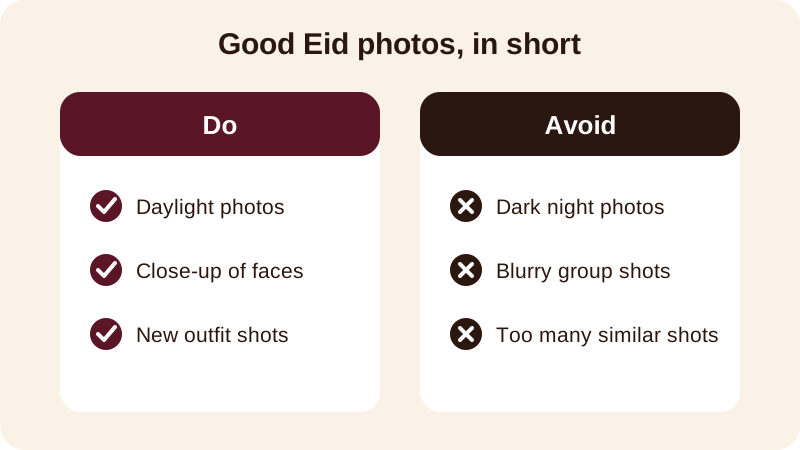
Put your strongest photo first — a smile, a close face, new clothes or hands offering sheer khurma — because the first second decides whether someone watches or scrolls past. Save wide shots of a crowded hall or a long table for the middle of the video, not the opening.
If you're making this for an elder, one photo of them alone, looked at warmly, usually lands better than a big group photo where they are hard to spot. This is also where an Android photo video maker like Diya helps — you arrange the order yourself, so the photo that matters most comes first.
What should you write as your Eid Mubarak wish?
Keep the text short enough to read in one glance — one line is better than three on a phone screen. A few lines that work well as an Eid status video with name added underneath:
- Eid Mubarak to you and your whole family
- May this Eid bring peace, good health and happiness to your home
- Eid Mubarak — from our home to yours
- Wishing you a blessed Eid-ul-Fitr filled with warmth
- Eid Mubarak, [name] — may Allah accept your prayers and fasts
If the video is for one person — a parent far away, a close friend, an in-law — swap in their name instead of your own. An Eid mubarak video maker that lets you type a name directly onto the screen, rather than just a generic greeting, makes the video feel like it was made just for them.
Which song suits an Eid status video?
You can keep the song that comes with the Eid template, pick a calmer or more festive track from the free music library, or use your own saved song from your phone. For a wish aimed at an elder, a soft, calm track usually feels more respectful than a loud, fast one.
Beat-sync will still change your photos in time with whichever song you choose, so you don't need to line anything up by hand. This works the same whether you're posting the clip as a vertical video for Instagram Reels or straight to WhatsApp Status, since every Diya video is already made in the 9:16 shape both places expect.
What's included in Diya's free version?
Your first 2 videos are free, and after that you get 1 free video every day, in 720p, with a small "Diya" mark and a short "Made with Diya" end card. There are no ads, on Free or Premium.
Premium — available as Lifetime, Monthly or Annual — removes the mark and the end card and unlocks Full HD 1080p, 4K on Android, and premium templates. The app itself works in 11 languages, and a festival calendar quietly reminds you a few days before Eid so you're not scrambling the night before.
Once Eid is done, the same app carries you into the rest of the year's celebrations — see the full festival status videos calendar for Diwali, Chhath, Bhai Dooj, Holi and Navratri, or browse more guides on the blog for birthdays and weddings too.
Frequently asked questions
How long does an Eid Mubarak status video take to make?
With a ready-made Eid template in Diya, picking photos, typing your wish and adding music takes about 3 minutes. You choose a template, add 3 to 6 photos, type a line of text, pick the music, then save and share to WhatsApp Status.
Can I add a name to the Eid video?
Yes. Diya turns a typed name into glowing name art, so you can put your own name, your family's name, or the name of the person you are wishing on the video. It makes the greeting feel personal rather than generic.
Do I need to upload my photos anywhere to make the video?
No. Your photos are made into the video on your own phone and are never uploaded anywhere. You don't need an account to start, and the finished video stays on your phone until you share it yourself.
What music can I use in an Eid status video?
You can keep the song that comes with the template, pick another track from Diya's free music library, or use your own song saved on your phone. Beat-sync changes the photos in time with the music automatically.
Is the Eid Mubarak status video free to make?
Your first 2 videos are free, and after that you get 1 free video every day in 720p with a small Diya mark and a short end card. Premium removes both and adds Full HD options, but there are no ads either way.