Home › Blog › How to Make an Eid al-Adha Greeting Video
How to Make an Eid al-Adha Greeting Video
Last updated: November 17, 2026
A step-by-step guide to making an Eid al-Adha greeting video in Diya, from picking photos and a wish to choosing music and sharing it on WhatsApp Status.
Published
Quick answer
Here's how to make an Eid al-Adha greeting video: pick an Eid template in Diya, add family photos, type a wish, and save it — ready in about 3 minutes for WhatsApp Status.
Key takeaways
- Pick an Eid al-Adha template, add a few photos, type a wish, and Diya makes a 9:16 video in about 3 minutes.
- Choose respectful photos — prayers, new clothes, the family meal — not the qurbani itself.
- Add a personal wish or your family's name as glowing name art.
- Your first 2 videos are free, then 1 free video every day in 720p with a small Diya mark.
- Diya works in 11 languages, so your Eid wish can be written the way your family speaks.
If you're searching for how to make an Eid al-Adha greeting video, the quick answer is simple. Pick an Eid template in Diya, add your family photos, type a wish, and the app puts everything together with music in about 3 minutes, ready for WhatsApp Status.
How do you make an Eid al-Adha greeting video step by step?
You don't need any editing experience for this. Diya walks you through the same few taps whether you're making an Eid al-Adha status video, a Bakrid status video, or a greeting for any other festival on your calendar.
- Open Diya and choose an Eid template from the festival section.
- Add a few photos from your gallery and put them in the order you want.
- Type your wish and, if you like, your family's name as glowing name art.
- Keep the template's song or pick a different one from the free music library.
- Save the video and share it to WhatsApp Status, Instagram, or wherever your family will see it.
The whole process stays on your phone — there's no account to create and nothing to upload before you start. If this is your first time, you'll notice the template already has sample photos and text in place; you're simply swapping those for your own.
Which photos should you use for Eid al-Adha?
Three to six photos are usually enough for an Eid al-Adha wishes video. Think about the moments people will actually recognise — everyone dressed up for namaz, the family table set for the meal, sevaiyan or biryani being served, and the kids showing off their new clothes.
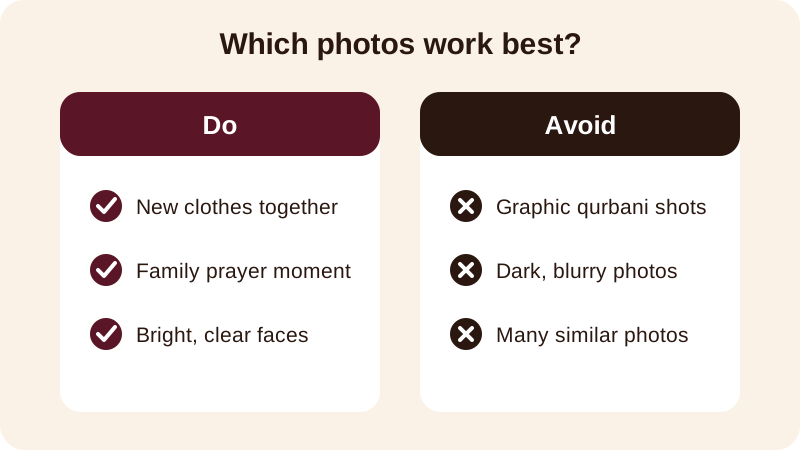
Keep faces large and well lit. A bright, close photo works better on a small phone screen than a wide, dim group shot taken from across the room. If you went to the mosque for Eid prayers, a respectful photo of the gathering from a distance works well too, without needing to show anything more private.
Your photos stay on your phone the whole time Diya is working on them — the app makes the video on your device and never uploads them anywhere, so family photos from Eid stay private between you and whoever you send the video to.
What should you write in an Eid al-Adha wish?
Keep the wish short enough to read in a couple of seconds. One line on screen is easy to read on a phone; three lines is not. A few lines that work well for an Eid al-Adha greeting video or Bakrid status video:
- Eid Mubarak from the Khan family — may Allah accept your sacrifice and prayers
- Bakrid Mubarak — wishing you and your family peace, health and happiness
- Eid al-Adha Mubarak — may this day bring you closer to your loved ones
- Happy Eid al-Adha to the best family — sevaiyan at our place this year
- Eid Mubarak to you and your family, with love from ours
If the video is for one person — a parent far away, an elder uncle, or a close friend — type their name instead of your own. Diya's name art turns a typed name into decorated lettering, so it stands out the moment the video opens, and it reads as if the video was made for that one person.
What music works well for an Eid al-Adha video?
You can keep the template's own song, pick another track from the free music library, or use a song from your own phone if your family already has one they play around Eid. Beat-sync changes your photos on the beat of the song automatically, so you don't have to time anything yourself.
If you'd rather have the wish appear as readable lines in time with the song, lyrics mode shows one line at a time instead of the whole wish at once — useful if your message is a bit longer, like a dua for the family. For more on matching photos with a song, see our guide on adding background music to photos.
Can you make the video in your own language?
Yes. The Diya app works in 11 languages, so you can type your Eid al-Adha wish in the language your family actually speaks at home, and the app's own menus switch too, not just the text you type into the video. This matters more than it sounds — a wish written the way your family actually talks reads warmer than a translated line.
If your family usually writes festival wishes in Hindi, our guide on making a festival greeting video in Hindi walks through setting the language and typing the wish, and the same steps apply for an Eid al-Adha greeting.
What does Diya give you for free?
Your first 2 videos are free, then you get 1 free video every day, in 720p, with a small "Diya" mark and a short "Made with Diya" end card. There are no ads either way, on Free or Premium.
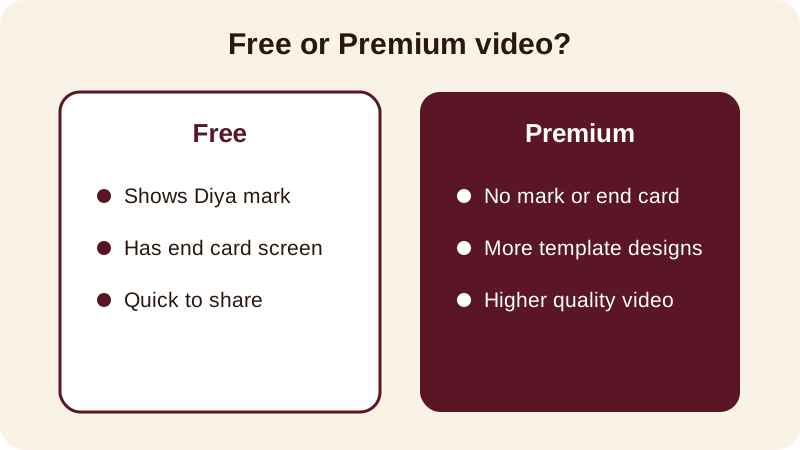
If you want to remove the mark and end card, or unlock more template designs and higher quality video, Premium — available as Lifetime, Monthly or Annual — does that. Either way, the video comes out in 9:16, the shape WhatsApp Status and Instagram expect, so it fills the screen properly on a phone.
Before your next celebration, you can browse the full festival status videos calendar for ideas on what's coming up, or look at the related Eid Mubarak status video guide for more wish lines and photo ideas. For everything else Diya can make, start from the blog.
Frequently asked questions
Can I make an Eid al-Adha greeting video without any editing skills?
Yes. Diya is built around ready-made templates, so you just pick an Eid template, add your photos, type your wish, and the app arranges the photos, text and music for you — no cutting, trimming or editing knowledge is needed.
What photos should I avoid in an Eid al-Adha video?
Avoid dark or blurry photos, large group shots where faces are too small to see, and anything graphic from the qurbani itself. Stick to warm, recognisable moments — prayers, new clothes, the family meal — that everyone will enjoy watching.
Can I add my family's name to the Eid al-Adha video?
Yes. Type your family's name or a loved one's name into the wish, and Diya's name art turns it into decorated lettering on screen. It is a simple way to make the greeting feel personal rather than generic.
Is making an Eid al-Adha video free?
Your first 2 videos on Diya are free, then you get 1 free video every day in 720p, with a small Diya mark and a short end card. Premium, available as Lifetime, Monthly or Annual, removes the mark and end card and unlocks more templates.
Can I make the Eid al-Adha greeting in Hindi or another Indian language?
Yes. The Diya app works in 11 languages, so you can set the app and type your wish in the language your family actually uses at home, then share the same video on WhatsApp Status or Instagram.