Home › Blog › Raksha Bandhan Video for Brother: Easy Guide
Raksha Bandhan Video for Brother: Easy Guide
Last updated: November 11, 2026
A step-by-step guide to making a Raksha Bandhan video for your brother in Diya, with photo tips, wish lines and a look at what the free tier includes.
Published
Quick answer
A raksha bandhan video for brother is easy in Diya: pick a festival template, add rakhi photos, type his name and a short wish, and the app makes a vertical video with music in about 3 minutes.
Key takeaways
- Pick 4 to 6 rakhi photos and open with the brightest, clearest one
- Type your brother's name as glowing name art so it feels personal
- Keep the wish to one short line that is easy to read on a phone
- Beat-sync changes photos on the beat automatically, no timing needed
- First 2 videos are free, then 1 free video a day in 720p with a small mark
The easiest way to make a raksha bandhan video for your brother is to open Diya, pick a festival template, add a few rakhi photos, and type his name and your wish — the app turns it into a vertical video with music in about 3 minutes.
What makes a good Raksha Bandhan video for your brother?
A good rakhi video doesn't need every photo from the day. Four to six photos, chosen well, beat twenty photos thrown in together. Pick a recent, clearly lit photo of the two of you, a close-up of the rakhi on his wrist, and one childhood photo if you have it — that mix of "now" and "then" is what makes a sibling feel seen.
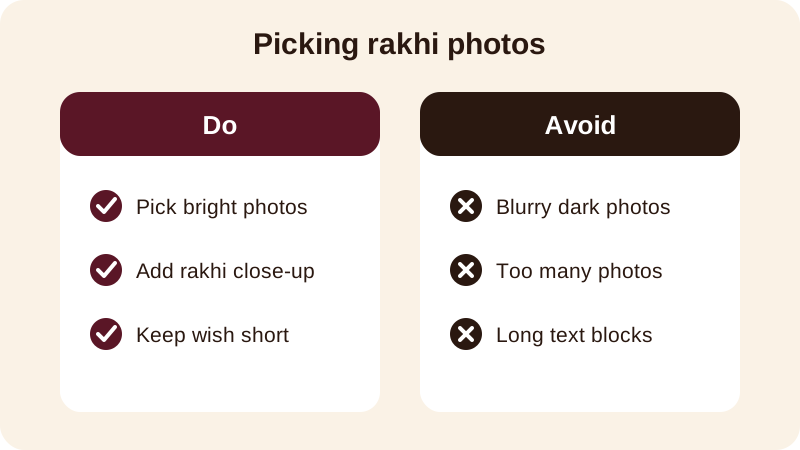
Put the strongest photo first. Whoever opens the video on WhatsApp Status decides in a second whether to keep watching, so start with a close, well-lit face rather than a wide, dark group shot from the back of the room.
How do you make a Raksha Bandhan video in Diya, step by step?
You don't need any editing experience for this. Diya does the timing, the transitions and the music sync for you — you only choose the photos, the words and the song.
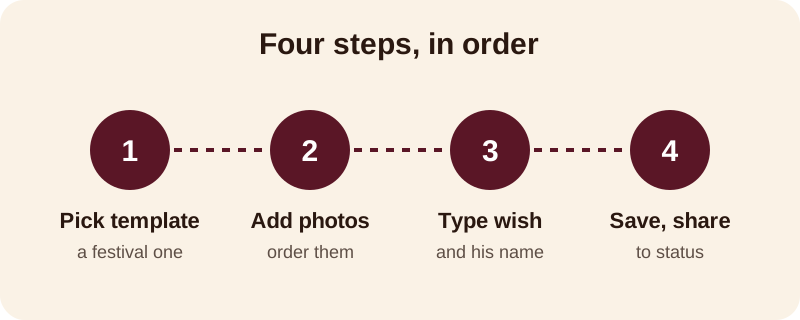
- Open Diya and pick a festival template whose colours suit a rakhi theme — warm reds, golds and soft pastels all work.
- Add your four to six chosen photos and arrange them so the video opens strong and closes on your favourite shot of the two of you.
- Type your wish, then add your brother's name as name art so it stands out as decorated lettering rather than plain text.
- Check the music. Keep the template's song, pick another from the free music library, or use a song already on your phone — beat-sync will change the photos on the beat without any timing on your part.
- If you want the words to land one at a time with the song, turn on lyrics mode so each line shows as it's sung.
- Save the video and share it straight to WhatsApp Status, or send it to your brother directly if he's not nearby this year.
What should you write in a Raksha Bandhan wish for brother?
Short and personal always beats long and formal. A line with his name in it feels like it was made for him, not copied from somewhere online. A few that work as they are, or as a starting point:
- Happy Raksha Bandhan, [name] — this rakhi comes with all my love
- No distance can break this bond, bhai — Happy Raksha Bandhan
- To the brother who's always had my back — Happy Rakhi
- Promise se zyada, pyaar se bandha hai yeh rakhi — Happy Raksha Bandhan
If you're writing as a younger sister to an older brother, or the reverse, the tone can shift slightly. Here are a few starting points by relationship:
| Who's writing | Wish line |
|---|---|
| Younger sister to brother | Thank you for always protecting me — Happy Raksha Bandhan, bhai |
| Older sister to brother | Watching you grow up has been my favourite thing — Happy Rakhi |
| Twin or close-in-age siblings | From childhood fights to lifelong friendship — Happy Raksha Bandhan |
| Sister far from home | Missing you today, but this rakhi still reaches you — Love always |
Add the year or a small family detail if you like — "Rakhi 2026 from all of us at home" makes the video feel specific rather than generic, especially if you're sending it to a brother who lives away from the family.
What does Diya's free version include for Raksha Bandhan videos?
Your first 2 videos in Diya are free, and after that you get 1 free video every day, so there's no rush to get everything perfect in one try. Free videos are made in 720p and carry a small "Diya" mark with a short "Made with Diya" end card — there are no ads either way, free or Premium.
If you want the mark and end card gone, or you'd rather export in Full HD 1080p or 4K on Android, Premium (Lifetime, Monthly or Annual) unlocks that along with premium templates. Everything happens on your phone — your photos are made into video on your phone and never uploaded, and there's no account needed to get started.
Once the rakhi video is sent, keep the same photos and template handy — Diya's festival calendar will remind you before the next occasion, whether that's Bhai Dooj a few weeks later or a birthday in the family. If you're looking for the sibling-festival version of this guide, see how to make a Bhai Dooj status video or a Bhai Dooj video with photos, and browse more festival video guides on the blog for whatever comes next on the calendar.
Frequently asked questions
How do I make a Raksha Bandhan video for my brother on mobile?
Open Diya, pick a festival template, add 4 to 6 rakhi photos, type your brother's name and a short wish, choose music, then save. The whole process happens on your phone in about 3 minutes and the video is ready to share to WhatsApp Status.
What photos should I use for a rakhi video?
Use a recent, well-lit photo of you two together, a photo of the rakhi on his wrist, and one childhood photo if you have it. Four to six photos is enough — pick the clearest ones rather than every photo from the day.
Can I add my brother's name to the video?
Yes. Diya's name art turns a typed name into decorated lettering, so you can put his name on screen along with your wish instead of leaving the video generic.
Is the Raksha Bandhan video free to make?
Your first 2 videos are free, then you get 1 free video every day, in 720p with a small Diya mark and a short end card. Premium removes the mark and end card and unlocks Full HD 1080p and 4K on Android.
Can I use my own song for the video?
Yes. You can pick a song from Diya's free music library or use a song already on your phone, and beat-sync will change the photos on the beat of that song automatically.