Home › Blog › How to Make a Bhai Dooj Video With Photos
How to Make a Bhai Dooj Video With Photos
Last updated: November 7, 2026
A step-by-step guide to turning photos of you and your sibling into a Bhai Dooj video with music using Diya, ready to share on WhatsApp Status.
Published
Quick answer
To make a Bhai Dooj video with photos, pick a Bhai Dooj template in Diya, add a few photos of you and your sibling, type a wish or their name, and the video is ready with music in about 3 minutes.
Key takeaways
- Pick 3 to 5 close, bright photos of you and your sibling instead of large group shots
- Diya turns the photos into a 9:16 Bhai Dooj video with music in about 3 minutes
- Add your brother's or sister's name as glowing name art for a personal touch
- Your first 2 videos are free, then 1 free video every day in 720p with a small mark
- Premium removes the mark and end card and unlocks Full HD or 4K
The easiest way to make a Bhai Dooj video with photos is to pick a Bhai Dooj template in Diya, add a few photos of you and your sibling, type a wish or their name, and let the app put it together with music in about 3 minutes.
Which photos work best for a Bhai Dooj video?
Pick photos that show the bond clearly — not every photo you have of the two of you. Three to five photos is plenty for a short video that someone will watch on their phone for a few seconds at a time.
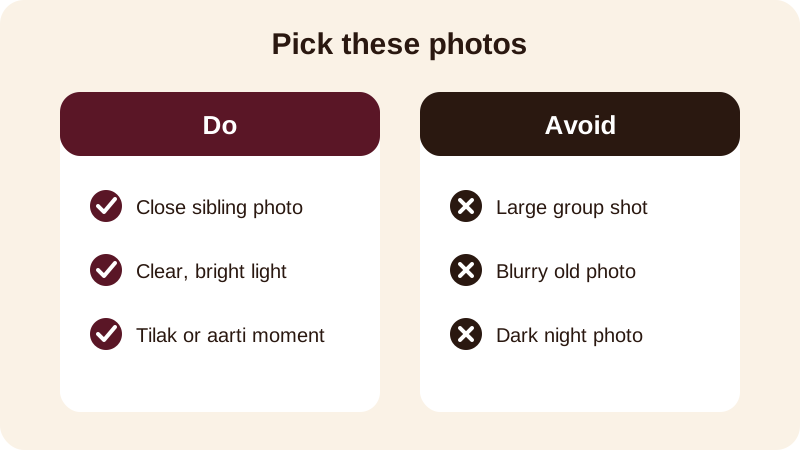
If you have a childhood photo of the two of you, add it near the start or end — it is usually the one that makes a brother or sister pause and smile. Keep the order simple: childhood photo, a recent photo together, then a photo of the tilak or aarti if you have one from an earlier year. If you don't have an old photo handy, two or three recent ones in good light still make a warm video — the point is clarity, not quantity.
How do you make the video step by step?
Once your photos are chosen, making the actual Bhai Dooj photo video with song takes a few taps in Diya.
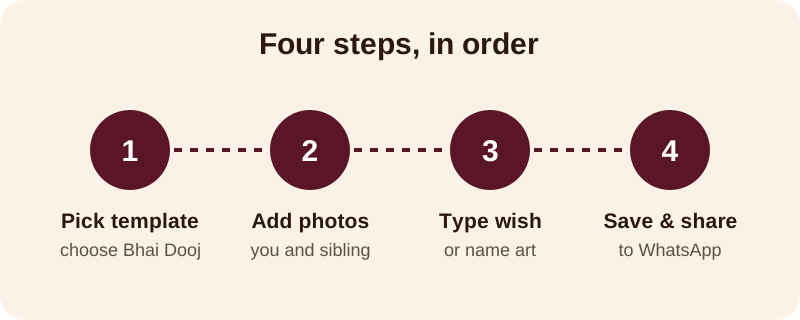
- Open Diya and choose a Bhai Dooj template from the festival templates.
- Select 3 to 5 photos of you and your sibling and arrange them in order.
- Type your wish, or use name art to add your brother's or sister's name on screen.
- Keep the template's song, or pick another one from the free music library, or use your own song from your phone.
- Check the preview, save the video, and share it to WhatsApp Status or send it directly in a chat.
Beat-sync is already switched on, so the photos change on the beat of the song without you setting any timing. If you prefer the words of the wish to appear one at a time instead of all together, turn on lyrics mode so each line shows up with the music. The whole thing happens on your own phone, so you don't need to sign up for anything or wait for a file to upload before you can preview it.
What should you write for a brother or a sister?
A Bhai Dooj video with name is more personal when the words are specific, not generic. A few lines you can use directly, swapping in the name:
- Happy Bhai Dooj, [Name] — may you always be safe and happy
- To my brother [Name], my protector since childhood — Happy Bhai Dooj
- Sisters like [Name] make Bhai Dooj the best day of the year
- Miles apart but close at heart — Happy Bhai Dooj, [Name]
- Thank you for always being there, [Name] — Happy Bhai Dooj
If your brother or sister lives in another city and cannot come home this year, say that in the video rather than pretending nothing has changed — a line like "missing you this Bhai Dooj, see you soon" feels more honest than a standard wish, and it reads well on WhatsApp Status too.
What if your brother or sister is far away this year?
Many families now have one sibling working in another city, so the tilak happens over a video call instead of in person. A Bhai Dooj video still works well here — in fact it often matters more, because it is the one thing you can send that feels personal rather than a plain text message.
Use photos from past Bhai Doojs together along with a recent one, even if it is just a selfie from a call. Write the wish as if you are speaking directly to them: "Missing the tilak with you this year, [Name], but sending all my love" reads better than a generic greeting copied from somewhere. You can also record the video the night before so it is ready to send first thing on the day, rather than rushing through it in the morning between other rituals.
If you are the one away from home, consider sending the video first — it often becomes the thing your parents or siblings replay a few times through the day, especially if a childhood photo is in there somewhere.
What does the free version of Diya include?
Your first 2 videos in Diya are free, and after that you get 1 free video every day. Free videos are in 720p and carry a small "Diya" mark with a short "Made with Diya" end card, and there are no ads either way. If you want to remove the mark and end card, or export in Full HD or 4K, Premium — Lifetime, Monthly or Annual — unlocks that along with the premium templates.
No account is needed to start, and your photos are made into the video on your own phone and never uploaded anywhere, so a private family photo stays private. The app works on Android and iPhone, so it does not matter which phone your sibling uses when you send them the finished video. The app is also available in 11 languages, so you can set it up in whichever language feels most comfortable for typing the wish.
Once Bhai Dooj is done, the same app works for the festivals coming right after it. You can check the festival status videos calendar so you don't miss Chhath Puja, or look at the dedicated Bhai Dooj status video page for more template ideas. If you want to understand how music and beat-sync work in more detail before you start, the guide on adding background music to photos walks through it step by step.
Frequently asked questions
How many photos should I use for a Bhai Dooj video?
Three to five photos are usually enough. Pick clear, close photos of you and your sibling — the tilak moment, a photo together, and one each — rather than a big group photo where faces get too small to see on a phone screen.
Can I put my brother's or sister's name on the video?
Yes. Diya's name art turns a typed name into decorated lettering, so you can add your brother's or sister's name on screen along with your wish, making the Bhai Dooj video feel made just for them.
What music should I add to a Bhai Dooj video?
You can pick a song from Diya's free music library or use your own song saved on your phone. Beat-sync then changes the photos on the beat automatically, so you don't have to time anything yourself.
Is making a Bhai Dooj video with Diya free?
Your first 2 videos are free, then you get 1 free video every day in 720p with a small Diya mark and a short end card. Premium removes the mark and end card and unlocks higher resolution.
Does Diya work on both Android and iPhone?
Yes, Diya is made for Android and iPhone, so whether your brother or sister uses one or the other, you can make the video on your own phone and send it to them directly.