Home › Blog › Good Morning Status Video With Photo: Easy Guide
Good Morning Status Video With Photo: Easy Guide
Last updated: November 1, 2026
A step-by-step guide to turning one photo into a good morning status video with music, a short wish and a name, ready for WhatsApp Status in minutes.
Published
Quick answer
A good morning status video with photo is made in Diya by picking a template, adding your photo, typing a short wish and letting the app add music — ready in about 3 minutes for WhatsApp Status.
Key takeaways
- Pick a template, add one or two photos, type a short wish and the video is ready in about 3 minutes
- A bright, close, vertical photo reads better on a phone screen than a dark or group photo
- Beat-sync changes your photo on the beat, and you can use the free music library or your own song
- Name art turns a name into glowing lettering so the video feels made for one person
- The first 2 videos are free, then 1 free video a day in 720p with a small Diya mark
The quickest way to make a good morning status video with photo is to pick a template in Diya, add your photo, type a short good morning line and let the app add music. The whole video is ready in about 3 minutes, in the vertical shape WhatsApp Status needs.
How do you make a good morning status video with a photo?
You don't need any editing skill for this — the template does the layout, you just fill in your photo and your words. Here is the order it goes in.
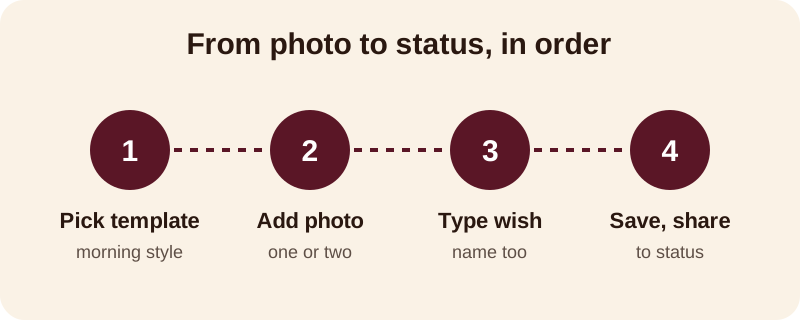
- Open Diya and choose a template that suits a good morning message — something soft and simple works better than anything too busy or too bright for early morning scrolling.
- Add your photo. One photo is enough; two works if you want to show a sunrise or garden shot along with a face.
- Type your good morning line, and add a name as name art if the video is for one person, like a parent or a close friend.
- Check the music — keep the template's song or pick one from the free music library, or use your own song from your phone.
- Save the video and share it straight to WhatsApp Status or Instagram.
Which photo works best for a good morning status?
A good morning video is usually watched in a hurry, often before someone has even had their chai, so the photo has to read in a second. A bright, close, vertical photo of a face, a sunrise, diyas by a window or hands folded in prayer all work well.
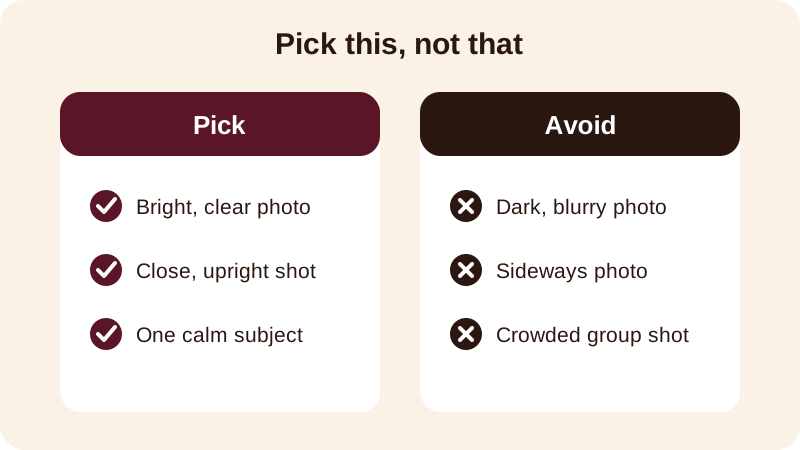
Sideways photos get cut down or leave empty space on a vertical video, so turn your phone and shoot upright when you can. A photo of flowers on the balcony, a cup of chai, or the first light through a window works just as well as a selfie — not every good morning status needs a face in it. If you are sending the video to someone far from home, an old family photo together with a fresh line of text often means more than a brand new photo on its own.
What should you write as a good morning wish?
Simple and warm beats long and formal, especially this early in the day. A line that fits one row on the screen is read in full; anything longer gets skipped. A few that work well, copy and change as you like:
- Good morning — hope your day is as bright as this sunrise
- Rise and shine — sending you love this morning
- Good morning, Papa — have a peaceful day
- Wishing you a calm, happy morning ahead
- Good morning to the best friend anyone could ask for
- Another beautiful morning, another chance to smile — good morning
If the video is going to one person — a parent, partner or close friend — type their name in the wish and turn it into name art, Diya's glowing lettering style. It takes the message from a line everyone could have sent to one that was clearly made for them. A grandparent in particular tends to notice their own name on screen before anything else in the video.
Which song suits a good morning video?
Soft and simple suits a morning message better than anything loud. Diya's free music library has tracks you can pick straight from the app, or you can use your own song from your phone if there's one that already feels right for this person or this morning.
Beat-sync changes your photo on the beat of whichever song you choose, so even a single photo held through a short, gentle song doesn't feel static. If the song has words that matter to you, lyrics mode shows one line of the lyrics at a time on screen, which works well for a devotional or prayer-style good morning video sent to older family members.
Once you're comfortable making a good morning video, the same steps work for other quick daily shares — a good night message, a thank-you to a friend, or a short clip before a festival. If you want help getting music and photos together in general, see this guide to adding background music to photos, and if you're on Android and want the basics of turning a photo into a video at all, start with how to turn photos into a video on Android.
What does the free version of Diya include?
Your first 2 videos in Diya are free, and after that you get 1 free video every day, in 720p, with a small "Diya" mark and a short "Made with Diya" end card. There are no ads, on Free or Premium. If you want the mark and end card gone, along with Full HD 1080p and, on Android, 4K, Premium is available as Lifetime, Monthly or Annual.
A good morning status doesn't need Premium to work well — a daily free video in 720p is more than enough for WhatsApp Status. Save Premium for the videos you'll keep longer, like a festival wish or a wedding invitation. There is no account needed to start, and your photos are made into the video on your own phone and never uploaded anywhere, which matters for a video of family going out to a wider circle on Status.
Once a festival is close, the same photo-and-template approach carries straight over from a simple good morning video to something bigger. Check the festival status videos calendar for upcoming dates, so you're never making a Diwali or Bhai Dooj video in a last-minute rush the way a good morning status sometimes has to be.
Frequently asked questions
Can I make a good morning status video with just one photo?
Yes. One clear, bright photo is enough for a good morning status — in Diya you can pick a template, add that single photo, type your wish and the video is ready. You don't need a set of photos; a single good photo often works better than several similar ones.
How do I add a name to a good morning video?
When you type your wish in Diya, you can also add the person's name as name art, which turns the typed name into decorated lettering on the video. This makes the good morning video feel made specially for that person rather than a generic message.
Can I use my own song for the good morning video?
Yes, Diya lets you use a song from your phone instead of the free music library. Pick the song when you build the video, and beat-sync will change your photo on the beat of that song, just as it does with library tracks.
What size should a good morning status video be?
Every video made in Diya is 9:16, the vertical shape WhatsApp Status and Instagram use, so you don't need to crop or resize anything before sharing. The video is ready to post as soon as you save it.
Is making a good morning status video free?
Your first 2 videos in Diya are free, and after that you get 1 free video every day in 720p with a small Diya mark and a short end card. Premium removes the mark and the end card and unlocks Full HD 1080p and, on Android, 4K.