Home › Blog › Wedding Anniversary Video With Photos and Song
Wedding Anniversary Video With Photos and Song
Last updated: October 31, 2026
A how-to guide for making a wedding anniversary video with photos and song using Diya's anniversary templates, music options, name art and wish lines.
Published
Quick answer
The fastest way to make a wedding anniversary video with photos and song is to pick an anniversary template in Diya, add couple photos, and choose a song from the free music library or your phone - ready in about 3 minutes.
Key takeaways
- Pick four to eight photos that mix old and new, then choose a song the couple already loves
- Diya turns photos into a 9:16 video with music in about 3 minutes, no editing skills needed
- Add glowing name art for the couple's names and use lyrics mode for an emotional song
- First 2 videos are free, then 1 free video a day in 720p with a small Diya mark; Premium removes it
- Save and share straight to WhatsApp Status - the video is already the right shape
The fastest way to make a wedding anniversary video with photos and song is to pick an anniversary template in Diya, add your couple's photos, and let the app add music — the whole video comes together in about 3 minutes. You can use a song from the free music library or add a song already saved on your phone.
What photos and song should you pick for an anniversary video?
Pick four to eight photos that tell the story of the marriage rather than photos from just one event. A good mix is the wedding-day photo, one from the early years, a family photo if there are kids, and a recent photo of the couple together. An anniversary video with song feels special when it mixes an old photo with a new one — that contrast of "then and now" is what makes people stop scrolling on WhatsApp Status and actually watch till the end.
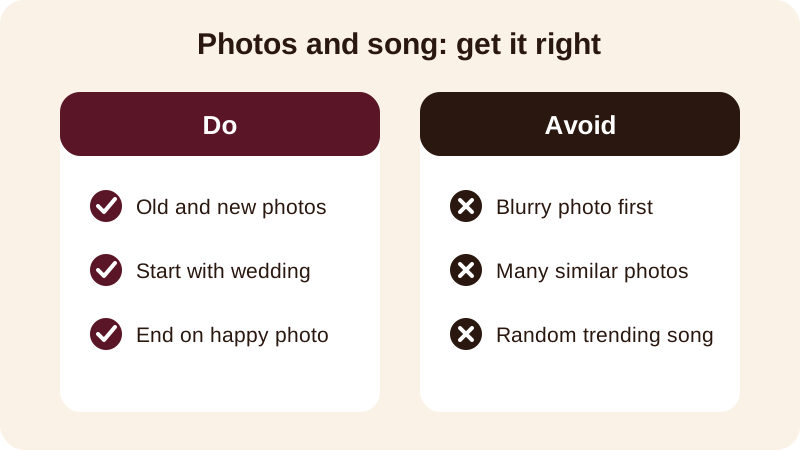
Order matters almost as much as selection. Starting with the wedding photo and ending on a recent, happy photo gives the video a shape — it moves forward in time, the way the marriage itself has. Keep a dark, blurry or badly damaged old photo out of the opening slot; it can still go in the middle, once the viewer is already watching.
For the song, think about what the couple actually plays at home rather than whatever is trending that week. Diya lets you use a song from the free music library or add a song already saved on the phone, and beat-sync changes the photos in time with the music on its own, so you don't have to match timings by hand.
How do you make the video in Diya, step by step?
Once you've picked the photos and decided on the music, the actual making takes only a few taps on your phone.
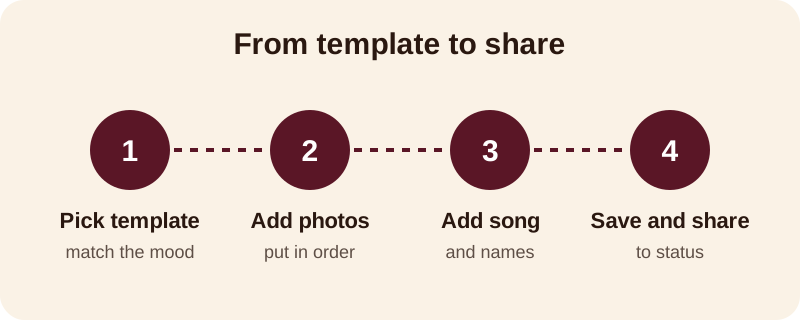
- Open Diya and choose an anniversary template whose colours and mood suit the couple — soft and romantic for a young couple, warmer and more classic for parents.
- Add your four to eight photos and arrange them in order, oldest to newest, or however the story flows best.
- Type the couple's names — Diya can turn a typed name into glowing name art for the opening or closing frame.
- Pick the song: keep the template's track, choose another one from the free music library, or add a song saved on the phone.
- Save the video and share it straight to WhatsApp Status or Instagram.
The finished clip is a vertical 9:16 video, already the right shape for WhatsApp Status, so there's no cropping or resizing to do on your end. Everything happens on the phone itself — your photos are made into the video there and are never uploaded anywhere, and you don't need an account to get started.
How do you make it feel personal, not generic?
Two small touches turn a plain anniversary whatsapp status video into one that feels made specifically for the couple: the names on screen and the words that go with them.
Name art turns a typed name — the couple's names together, or simply "Mummy & Papa" — into decorated lettering instead of plain text, so the opening frame looks designed rather than typed in a hurry. Turning the title into an anniversary video with name art is an easy way to make even a simple template feel special. If the song has meaningful lyrics, lyrics mode shows one line of the words at a time on screen in step with the music, which suits a slow, emotional song playing under old photos.
Diya's full app works in 11 languages, so if the wish reads better in Hindi, Tamil, Bengali or another Indian language than in English, you're not stuck writing it in English and losing the feeling.
What should you write as the anniversary wish?
Keep it to one short line on screen. A phone screen is small, and a long paragraph of text is hard to read while someone is quickly scrolling through status updates. A few lines that work well:
- Happy Anniversary to the best couple we know
- Wishing Mummy-Papa many more years of love like this
- Here's to us — happy anniversary
- Same love, more years — happy anniversary
- Celebrating another year of you and me
If the video is for parents or in-laws, use their names instead of a generic "happy couple" line — it reads as if it was made specifically for them, not copied from somewhere else.
Which song mood suits which anniversary?
Not every anniversary calls for the same kind of song — a first anniversary and a parents' anniversary usually feel different, and the music should match.
| Occasion | Song mood that usually works |
|---|---|
| First anniversary | Upbeat and romantic, something the couple danced to at the wedding |
| Anniversary for parents | Soft, nostalgic, sometimes a devotional song |
| 25th anniversary | A song that was popular around the year they married |
| 50th anniversary | Slow and classic, matching the mood of the old photos |
Whichever mood you choose, beat-sync will still change the photos on the beat, so even a slow song doesn't feel static on screen.
What's different about a milestone anniversary, like a 25th or 50th?
A milestone anniversary video usually leans on older photos — wedding albums, early family pictures, photos of the children when they were small — rather than only recent ones, and it often goes out to a wider family group, not just the couple themselves. The photos may be faded or a little damaged, and that's fine; a video actually hides small flaws better than a printed enlargement does.
If you're building one specifically for a 50th anniversary, see how to make a 50th anniversary slideshow for more on choosing and ordering old family photos. Whatever the milestone, the steps in Diya stay the same: pick a template, add photos, choose the song, and save.
Read more on adding background music to your photos, or browse more occasion video guides on the blog for birthdays, weddings and festivals, or see what else Diya can make before the next family occasion.
Frequently asked questions
How do I make a wedding anniversary video with photos and song on my phone?
Open Diya, pick an anniversary template, add four to eight photos of the couple, and choose a song from the free music library or your own phone. Type a short wish, add the couple's names, and save - the whole video comes together in about 3 minutes, ready for WhatsApp Status.
Which song should I use for an anniversary video?
Pick a song the couple already likes rather than a trending track - their wedding song or first-dance song works well. Diya lets you use a song from the free music library or add one saved on your phone, and beat-sync changes the photos in time with it automatically.
How many photos should I use for an anniversary video?
Four to eight photos is usually enough. Mix an old photo, like the wedding day, with a recent one of the couple together, so the video shows how the relationship has grown over the years rather than just one event.
Can I add the couple's names to the video?
Yes. Type the couple's names and Diya turns them into glowing name art for the opening or closing frame, instead of plain text. This makes the video feel made specifically for them rather than a generic template.
Is the anniversary video free to make?
Your first 2 videos are free, then you get 1 free video every day in 720p with a small Diya mark and a short end card. Premium removes the mark and end card and unlocks 1080p, 4K on Android, and premium templates.