Home › Blog › How to Make a 50th Anniversary Slideshow
How to Make a 50th Anniversary Slideshow
Last updated: October 12, 2026
A step-by-step guide to building a 50th anniversary slideshow that sorts photos by decade, pairs them with meaningful music, and exports ready to share or play at the party.
Quick answer
To make a 50th anniversary slideshow, sort photos by decade, pick a few from each era, and build it in Photo Video Maker with filters, frame overlays, and music between eras before exporting as MP4.
Key takeaways
- Sort photos by decade so the slideshow reads as a fifty-year timeline, not a random pile
- Use frame overlays on milestone photos like the wedding and today to mark key moments
- Pick a song meaningful to the couple instead of a trending track for more emotional impact
- Export in 1080p for a TV or projector, 480p for quick sharing by email or message
Here's how to make a 50th anniversary slideshow: sort your photos by decade, pick a handful from each one, and let one app lay them over music with transitions between eras. You don't need any editing experience — just photos and about twenty minutes with Photo Video Maker.
What photos should you include in a 50th anniversary slideshow?
Building a clear anniversary photo slideshow timeline starts with grouping pictures decade by decade, from the wedding through today. Start with the wedding day itself — the dress, the cake, the group shot on the church steps — then move forward through the first apartment, the first baby, family vacations, the grandkids, and a few photos from this year. Aim for a similar number of photos from each decade, maybe five or six, so one era doesn't dominate the video while the others feel rushed.
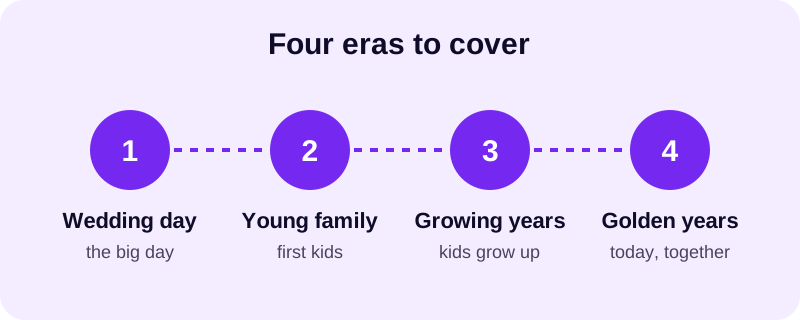
Don't worry if your earliest photos are old prints instead of digital files. A quick phone-camera photo of the photo works fine — Photo Video Maker reads standard photo formats including JPG, PNG, and WebP, so whatever comes off a scanner or a scanning app will drop straight in. Dig through shoeboxes, ask siblings and kids for photos you haven't seen before, and don't skip the slightly blurry ones — those old grainy prints are half the charm of a golden anniversary slideshow.
How do you actually build the video, step by step?
Once your photos are sorted roughly by decade, building the actual video is the fast part. Open Photo Video Maker, import the photos in order, and the rest is mostly tapping through a handful of choices rather than any real editing.
- Import your sorted photos and use drag and drop to fine-tune the order by decade.
- Pick an aspect ratio that matches where you'll show it — widescreen for a TV at the party, vertical for phones.
- Apply a filter to the whole set for a consistent look, choosing from 17+ filters.
- Add a frame overlay to the wedding photo and a few milestone shots, from 249 frame overlays.
- Drop in a transition between each decade, picking from 8 transition effects so the eras feel distinct.
- Add music from the built-in music library, or import a song that means something to the couple.
- Add text and stickers for the couple's names, the wedding date, and "50 years" near the start.
- Preview the whole thing with real-time preview and adjust timing before exporting.
- Export as MP4 in 1080p for a big screen, or 480p for a quicker, smaller file.
You don't have to get every choice right on the first pass. Real-time preview lets you check how a filter or transition actually looks against your own photos before you commit, so swap anything that feels off before you export the final file. For more on turning gallery photos into a finished video on your phone, see our guide on how to turn photos into a video on Android.
What's the best 50th anniversary slideshow music?
Music carries a fifty-year slideshow more than any filter does. A song from the couple's wedding year, or one they've always called "their song," works better than anything trending — it's the one detail that makes relatives tear up watching it.
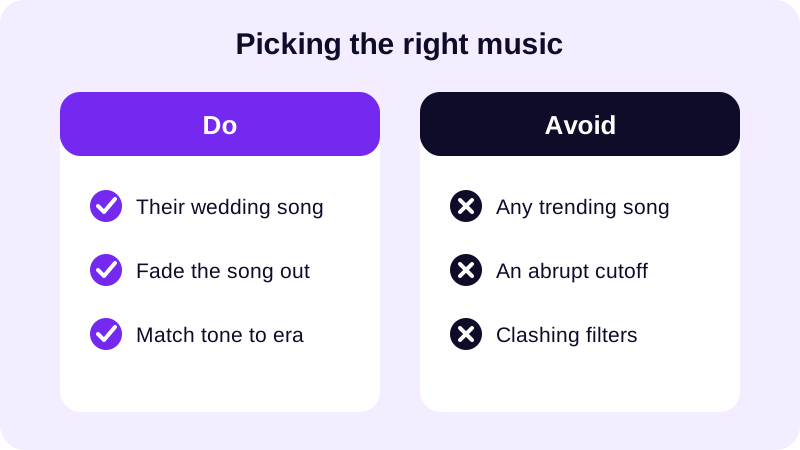
If the couple never had a specific wedding song, or nobody can track it down, browse the app's music library for something warm rather than upbeat. A golden anniversary slideshow almost always plays better slow and sentimental than fast and flashy. For more on sourcing a track and timing it to your photos, see our guide to royalty free music for videos, and for a broader look at pairing photos with a song, check our post on how to make a video from photos with music.
Try a slightly warmer filter on the earliest, faded-looking photos and a cleaner filter on recent ones, so each era reads a little differently without feeling mismatched. Keep the same frame style on every milestone photo — the wedding, the 25th anniversary, today — so viewers recognize them as the through-line even at a glance. You can also use text and stickers to label each decade right on screen — a simple caption like "the first ten years" or "today" before each cluster of photos helps younger relatives follow the timeline without anyone narrating it out loud.
How long should the video be, and where will you share it?
Most 50th anniversary slideshows run long simply because there's fifty years of material to cover — resist the urge to include every photo you found. For guidance on pacing and overall runtime, our post on how long a slideshow video should be covers how many photos keep a room watching instead of checking their phones.
Where you'll show the video changes a few settings worth deciding upfront. A video playing on a TV or projector at the anniversary party wants a wider frame, while a video you're sending to family in a group chat is better off narrower and built for a phone screen. If you're also posting a shorter clip to Instagram or TikTok afterward, our guides on the best aspect ratio for Instagram Reels and the best video size for YouTube Shorts cover the vertical settings those platforms expect.
If you're playing the video live at the party, loop it on a screen in the background before the meal starts, so guests can wander past and watch at their own pace instead of needing everyone seated for a formal viewing. However you share it — over WhatsApp, posted to YouTube for family who live far away, or played straight off a phone at the party — export once in 1080p for anything on a screen, and keep a 480p copy handy if you need to email it or send it somewhere with a smaller upload limit.
A fifty-year anniversary deserves more than a few photos tossed into a group chat. Once you've built one 50th wedding anniversary video this way in Photo Video Maker, available on Google Play, the next big milestone video — a reunion, a retirement, a big birthday — comes together just as fast, because you already know which filters and frames you reach for. Browse the blog for more milestone video ideas before your next one.
Frequently asked questions
How many photos should a 50th anniversary slideshow include?
Aim for a similar number from each decade — five or six works well — so the video covers fifty years without one era dominating and another feeling rushed. Twenty to thirty photos total usually keeps the length comfortable for a room full of relatives.
What music works best for a 50th anniversary slideshow?
The couple's actual wedding song, or whatever they've always called their song, beats anything trending. If you can't track it down, browse a warm, sentimental track from the app's music library rather than something upbeat or fast.
Can I use old printed photos in the slideshow?
Yes — a clear phone-camera photo of an old print works fine. Photo Video Maker accepts standard photo formats including JPG, PNG, and WebP, so scanned or photographed prints import the same way digital photos do.
What export size should I use?
Export at 1080p for anything played on a TV, projector, or shared to YouTube, and keep a 480p version on hand for emailing or sending somewhere with a smaller upload limit.
Should the slideshow stay in strict chronological order?
Chronological order is the easiest for relatives to follow, since it mirrors the actual fifty years. You can break it briefly for a highlight moment, but returning to decade order afterward keeps the timeline easy to read.