Home › Blog › How to Make a Sweet 16 Slideshow
How to Make a Sweet 16 Slideshow
Last updated: October 14, 2026
A step-by-step guide to building a sweet 16 slideshow that mixes childhood-to-now photos with music and exports it for the party screen or social media.
Published
Quick answer
How to make a sweet 16 slideshow: pick photos from childhood to now, order them to build momentum, layer in two or three songs that shift from nostalgic to upbeat, then export it in the right aspect ratio for the party screen or Instagram.
Key takeaways
- Mix childhood, tween, and current photos so the slideshow tells her whole story
- Pick two or three songs that build from nostalgic to upbeat
- Keep it tight — a long slideshow loses the room at a party
- Export vertical for Instagram and TikTok, widescreen for the venue TV
- Preview before exporting so transitions and timing feel right
How to make a sweet 16 slideshow comes down to picking photos that trace her from little kid to the young woman turning 16, timing them to music she actually likes, and exporting it in a shape that fits the screen it'll play on. You can do the whole thing on your phone with Photo Video Maker, without any video editing experience.
What photos should you include in a sweet 16 slideshow?
Start with baby pictures and early childhood shots, then move through school years, friends, family trips, and whatever she's into now, and end on recent photos of her as she is today. That arc — little kid to almost-grown — is what makes a sweet 16 slideshow land emotionally instead of just looking like a photo dump.
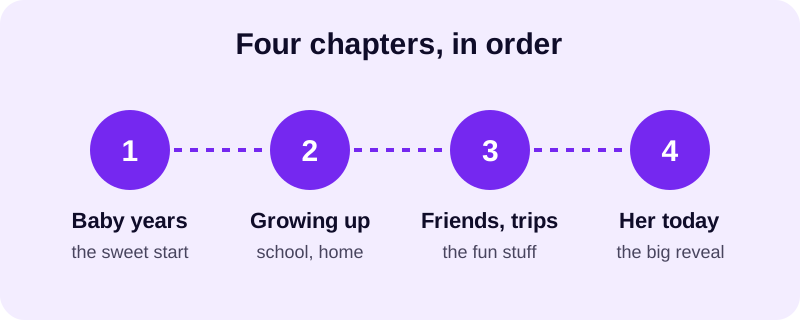
Ask her mom, dad, or whoever's been collecting photos for years to help pull old ones — there are usually gems buried in old phones nobody's looked at since the photo was taken. Don't worry about including everything. A tighter set of photos that each earn their spot beats a huge pile nobody really watches to the end. For guidance on exactly how many photos fit a given length, our post on how long a slideshow video should be breaks it down by occasion.
How do you pick music for a sweet 16 slideshow?
Match the song's energy to where you are in the photo timeline instead of picking one track and letting it run the whole way through. A softer, warmer song under the baby and childhood photos, followed by something more upbeat once you hit the friends-and-recent section, makes the slideshow feel like it's building toward something — which is exactly the feeling a sweet 16 should have.
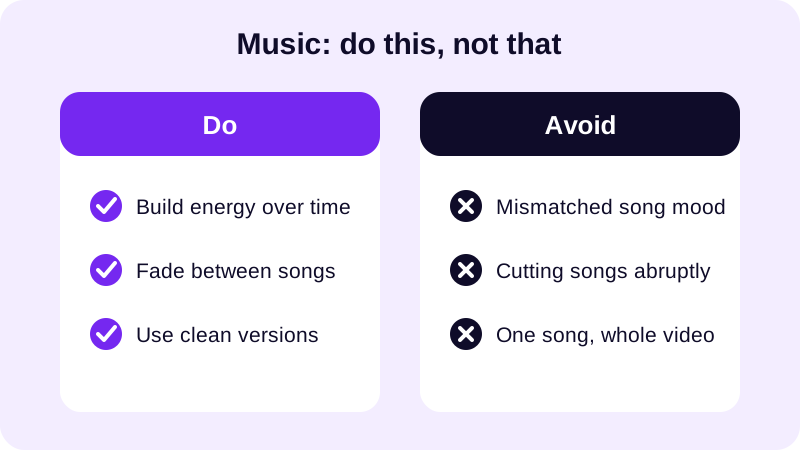
Photo Video Maker's built-in music library is organized by mood, so you can grab something fitting without hunting through your own files. If she's got a specific artist she loves, you can also import your own audio track instead. For more on where to source tracks and how licensing for shared videos works, see our guide to royalty free music for videos.
How do you actually build it, step by step?
Once your photos are picked and in order, assembling the slideshow itself is the fast part. Here's the sequence that works well for a sweet 16 specifically.
- Import your chosen photos from your gallery and drag and drop them into the order you planned — childhood first, today last.
- Pick an aspect ratio based on where it'll mostly play: widescreen for a TV or projector at the party, vertical for Instagram or TikTok.
- Apply a filter and a frame overlay that match the vibe — glam and bright for a sweet 16, with 249 frame overlays to choose from and 17+ filters to try.
- Add your music from the library, or import your own song, and let the app time transitions to the beat.
- Drop in text and stickers for her name, the date, or a short caption on the opening and closing slides.
- Use the real-time preview to watch it back before committing, then export as an MP4, in 480p or 1080p depending on where you're sharing it.
If you're building this on an Android phone and want the broader walkthrough on turning a whole gallery into a video, our guide on how to turn photos into a video on Android covers the basics of getting your gallery into the app in the first place.
What aspect ratio and export settings work best for a sweet 16 party?
This is the one detail people forget until the last minute, and it's worth deciding early. A slideshow built for a big screen at the venue doesn't look right squeezed into a phone feed, and the reverse is just as true.
| Where it'll play | Best aspect ratio |
|---|---|
| Projector or TV at the party | Widescreen |
| Instagram Reels or Stories | Vertical |
| TikTok | Vertical |
| WhatsApp group chat | Vertical or square, whichever the group prefers |
| YouTube upload | Widescreen |
If you only have time to export one version, pick whichever screen the bulk of your audience will see it on first — usually the party itself. You can always export a second version afterward for social media; Photo Video Maker saves your photo order, filters, and music choices, so you're not rebuilding it from scratch. For the exact settings, our posts on the best aspect ratio for Instagram Reels and the best video size for YouTube Shorts walk through platform-specific export choices.
Once you've got the version that'll play at the party, think about a second edit for the social media aftermath: a shorter cut with the best transitions, posted the next day, often gets more replay than the full version did at the event itself. The same photo set, filters, and music library choices carry over — you're just trimming for a different audience.
A sweet 16 slideshow doesn't need to be complicated to feel special. Pick the photos that tell her actual story, let the music shift with the mood, and export it for the screen that matters most first. Everything else — the frame, the filter, the transitions — is just the app in Photo Video Maker doing the polish work for you. Browse more slideshow guides on the blog once you're ready to plan the next celebration.
Frequently asked questions
How many photos should a sweet 16 slideshow have?
Somewhere around twenty to thirty photos usually works best. That's enough to cover childhood, friends, and recent shots without dragging on so long that the room stops watching. See our guide on slideshow video length for more on pacing by occasion.
What music works best for a sweet 16 slideshow?
Start with something softer and nostalgic for the early childhood photos, then shift to an upbeat, current song once the slideshow reaches her teen years and friend group. Two or three songs timed to photo sections feels more intentional than one long track.
Should the sweet 16 slideshow be vertical or widescreen?
It depends on where it plays. Widescreen suits a projector or TV at the venue, while vertical fits Instagram Stories, Reels, and TikTok. If you're sharing it both places, export both versions rather than forcing one shape to work everywhere.
Can I include throwback photos of her as a baby?
Yes, and it's one of the best parts of a sweet 16 slideshow. Starting with baby and childhood photos before moving into recent ones gives the video an arc, and it's usually the moment that gets the biggest reaction from family in the room.