Home › Blog › How to Make a Family Reunion Video
How to Make a Family Reunion Video
Last updated: October 9, 2026
A step-by-step guide to turning photos from every branch of the family into one shareable reunion video using Photo Video Maker.
Quick answer
To make a family reunion video, collect photos from everyone who attended, pick 20-30 that cover every generation, arrange them in order, add music and a filter in Photo Video Maker, then export and share.
Key takeaways
- Collect photos from every branch of the family, not just your own phone.
- Keep the photo count around 20-30 so no one loses interest halfway through.
- Arrange photos by generation or by moment, not just by the order they arrived.
- Add music from a library track and export so it plays easily on any phone.
- Share it in the family group chat or WhatsApp while the reunion is still fresh.
If you're wondering how to make a family reunion video that actually gets watched twice, start with the photos, not the editing app. Collect pictures from everyone who came, put them in order, add music, and export — the whole thing can come together in under an hour.
What should you gather before you start a family reunion video?
Ask every family member who came to send their photos, not just the ones from your own phone. Reunions always end up scattered across a dozen different camera rolls, and the best videos pull from all of them instead of just the organizer's gallery.
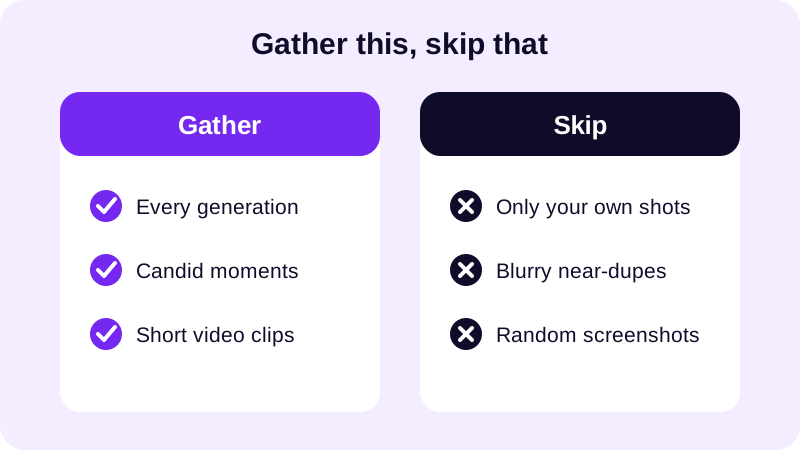
Aim for a mix: the oldest grandparent in the room, the newest baby, the cousins' table, the group shot on the porch. A video that only shows one branch of the family feels lopsided when the rest of the family watches it. Twenty to thirty photos is the sweet spot — enough to cover everyone without the video running so long that people stop paying attention halfway through.
How do you actually put the video together, step by step?
Once your photos are collected in one place on your phone, the building part is quick. Here's the order that works best for a reunion video specifically, where you're usually juggling photos from several decades and several phones at once.
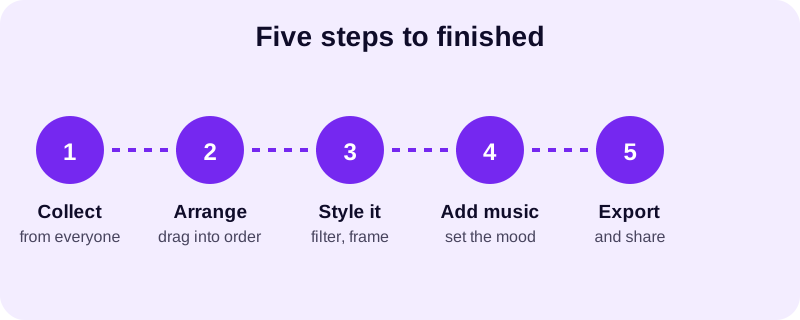
- Open Photo Video Maker and select the photos you've gathered from your gallery — it reads JPG, PNG, and WebP, so photos texted in from other phones work without any conversion.
- Drag and drop them into the order you want, generally oldest generation to youngest, or chronological if the reunion spanned a few days.
- Pick a filter and a frame overlay that fit the mood — with 17+ filters and 249 frame overlays to try, you can preview each one in real time before deciding.
- Add a transition between photos; there are 8 transition effects to choose from, so the video doesn't feel like a flat slideshow.
- Choose a track from the music library, or import a song the family already associates with these get-togethers.
- Pick an aspect ratio that matches how most relatives will watch it, then export as MP4 in 1080p or 480p and save it to your phone.
If you want more detail on getting photos off a phone and into a finished video the first time, this guide to turning gallery photos into a video on Android walks through the same basics with screenshots.
How do you keep it feeling like one family video instead of everyone's random photos?
The trick is grouping, not just ordering. Instead of dumping photos in randomly as they arrive in the group chat, sort them into rough chunks — arrival and setup, the meal, games and activities, the big group photo, goodbyes. Within each chunk, mix generations so grandkids and grandparents show up next to each other rather than in separate blocks.
One song tying the whole thing together does more for cohesion than any filter. Pick one track and let it run the full length of the video rather than switching songs partway through — a mid-video music change is the thing that makes a reunion video feel like two different clips stitched together. For picking something that won't get flagged or feel out of place, this guide to royalty free music for video slideshows covers where to find a track that fits.
Text and stickers are worth using sparingly here — a name or a date on a photo of great-grandma that younger cousins never met helps, but captioning every single photo slows the video down and starts to feel like a yearbook instead of a memory.
What's the best way to share it with the whole family afterward?
Export it once, in a format that plays everywhere, and send it to the group chat while the reunion is still fresh in everyone's mind — waiting a month means half the family has already moved on to the next thing. MP4 opens without any extra app on basically every phone, which matters when you're sending to relatives across different generations and devices.
WhatsApp and regular text messages are usually the easiest route for getting it in front of everyone at once, since most families already have a reunion or family group chat set up. If a few relatives want to post it publicly, Instagram, TikTok, and YouTube all accept the same exported file — just double check the aspect ratio works for the platform first, since a video exported square can look cropped oddly in a vertical feed. This guide on the best aspect ratio for Instagram Reels explains why vertical tends to look better on phones specifically.
Once you've built one reunion video this way, the next family gathering is faster to put together. You'll already know which filter and frame style the family likes, and you can reuse the same music if it became "the reunion song." For more ideas on turning a pile of gallery photos into something people actually watch, this guide to making a video from photos with music is a good next read, and the blog has more slideshow guides for other occasions too.
Frequently asked questions
How many photos should a family reunion video include?
Somewhere between 20 and 30 photos usually works best. That's enough to cover grandparents, parents, kids, and group shots without the video dragging on so long that people start scrolling past it.
What if relatives send photos in different formats?
It doesn't matter much. Photo Video Maker reads common formats including JPG, PNG, and WebP, so you can drop in photos texted from different phones without converting anything first.
What aspect ratio should I use for a family reunion video?
It depends on where it will be watched. If most relatives will view it on their phones in a group chat, a vertical or square aspect ratio reads better than widescreen on a small screen.
What kind of music fits a multi-generation video best?
Something warm and not too fast works for most reunions, since the video usually mixes decades of photos. A gentle track from a music library keeps the mood consistent from the oldest photo to the newest.
Can I make the video on my phone without a computer?
Yes. Photo Video Maker is built for exactly this — picking photos straight from your gallery, arranging them, adding music and filters, and exporting, all on the phone you already used to take the photos.