Home › Blog › How to Make a Chhath Puja Video With Photos
How to Make a Chhath Puja Video With Photos
Last updated: November 6, 2026
A step-by-step guide to turning Chhath Puja photos into a vertical video with music and a wish, using Diya's Chhath template.
Published
Quick answer
Here's how to make a Chhath Puja video with photos: pick the Chhath template in Diya, add ghat and family photos, type a short wish, choose music, and save — ready in about 3 minutes for WhatsApp Status.
Key takeaways
- Pick four to eight clear photos: arghya, sunrise or sunset, family, diyas on the ghat
- The Chhath template in Diya builds a 9:16 video in about 3 minutes
- Add a short wish or a name; one or two lines read best on a phone screen
- Choose a devotional song from the free music library or use your own song
- First 2 videos are free, then 1 free video a day in 720p with a small mark
If you want to know how to make a Chhath Puja video with photos, start by picking a Chhath template in Diya, adding your ghat and family photos, and typing a short wish. The app then adds music and finishes the video in about 3 minutes, ready to share to WhatsApp Status.
Which photos should you pick for a Chhath Puja video?
Choose photos that tell the story of the puja: the walk to the ghat before sunrise, the bamboo soop filled with fruit and thekua, the family standing in the water for arghya, and diyas lit along the bank at sunrise or sunset. Four to eight photos is enough for a good Chhath Puja video with photos — people watch WhatsApp Status quickly, so a few strong photos work better than a long, repeating set.
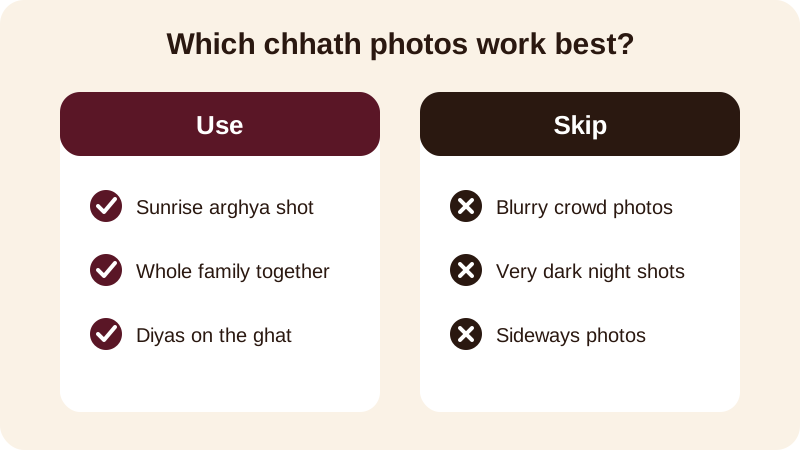
Put the brightest, clearest photo first. A sunrise or sunset shot with the family facing the water makes a strong opening frame. Since the finished video plays in 9:16, a photo taken straight on with faces in the middle will look better than one taken sideways or from far away — the shape of a vertical video matters more than people expect, and it's covered in this guide on reels orientation.
How do you make the video step by step in Diya?
Open Diya, go to the festival templates, and choose a Chhath design whose colours suit your photos — most use warm gold and red tones that match diyas and sindoor. From there, the app walks you through adding photos, text and music, one step at a time.
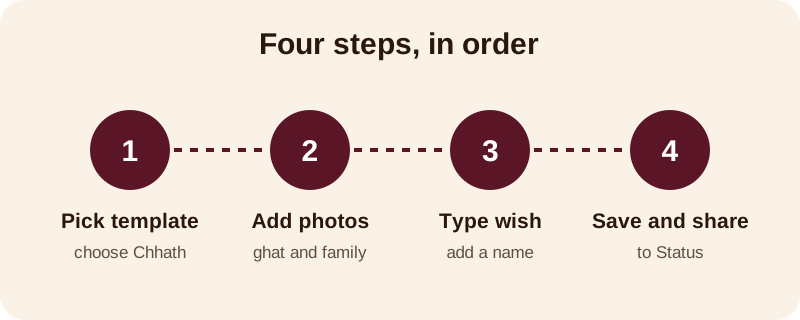
- Open the festival templates and choose a Chhath design
- Add four to eight photos from the ghat and home
- Arrange the photos in the order you want them to play
- Type your wish, and add a family member's name if you like
- Pick a song from the free music library, or keep the template's own music
- Save the video and share it to WhatsApp Status
Every Chhath Puja video that Diya makes plays in 9:16, built right there on your phone — your photos are never uploaded anywhere, and you don't need an account to start. If you're new to turning photos into a video on your phone at all, this guide for Android covers the basics in more detail.
What should you write as a Chhath Puja wish?
Keep the words simple and warm — this is a quiet, devotional festival, not an occasion for long captions. A short line that names Chhathi Maiya or the family reads better on a phone screen than a paragraph. A few you can copy or adapt:
- Chhath Puja ki haardik shubhkamnayein — may Chhathi Maiya bless our family
- Wishing you and your family a peaceful and blessed Chhath Puja
- Jai Chhathi Maiya — happiness and health to our whole family
- From our ghat to yours — Happy Chhath Puja
- Chhathi Maiya ki kripa sada bani rahe — Happy Chhath Puja to all of you
If you are making a Chhath Puja video with name for one person — a parent, a grandparent, or someone away from home this year — put their name in the wish instead of your own. Diya's name art turns that typed name into decorated lettering, so it stands out from the rest of the text instead of blending into a plain line.
Which music suits a Chhath Puja video?
Devotional and folk-style songs usually fit Chhath best, since the festival itself centres on quiet ritual rather than loud celebration. You can pick a track from Diya's free music library, or use a song already saved on your phone if your family has one they play every year at the ghat.
Once you choose a song, beat-sync changes your photos in time with the music on its own, so you don't need to time anything by hand. If you'd rather the words of the song appear on screen, lyrics mode shows one line at a time as the video plays — useful if the song carries meaning you want family to actually read, not just hear in the background. For more on matching photos to a song in general, see this guide to adding background music to photos.
What if you don't have many Chhath photos this year?
Not every family has a full album from the ghat — some years you only have two or three photos on your phone, especially if someone couldn't travel home for Chhath this time. That's fine. A short Chhath Puja slideshow for WhatsApp can work with just two or three strong photos and a slightly longer wish, rather than stretching thin photos across many frames. You can also mix in a photo from a previous year's Chhath alongside this year's, if it helps tell a fuller story of the family's puja.
Whatever the number of photos, keep the order simple: start with preparation or the walk to the ghat, move to the arghya or ritual moment, and close on a diya or sunset shot that feels like a blessing. That simple before-during-after order reads clearly even to someone scrolling quickly through Status.
What do you get for free, and what does Premium add?
Your first 2 videos in Diya are free, then you get 1 free video every day, in 720p, with a small "Diya" mark and a short "Made with Diya" end card. That's usually enough to make and share one Chhath Puja video the same evening.
| Tier | What you get |
|---|---|
| Free | 720p video, small Diya mark, short end card, no ads |
| Premium | No mark or end card, Full HD 1080p (4K on Android), premium templates, no ads |
Premium is optional — Lifetime, Monthly or Annual — and it also unlocks the full app in 11 languages along with the festival calendar, which reminds you ahead of Chhath, Bhai Dooj and the other festivals coming after it. You can browse what's next on the festival status videos calendar, or see Chhath-specific ideas and wordings on the Chhath Puja status video page.
Frequently asked questions
Can I make a Chhath Puja video without any editing skills?
Yes. You don't edit anything frame by frame. Pick the Chhath template in Diya, add your photos in order, type a short wish, and the app arranges the photos, music and text into a finished vertical video for you in about 3 minutes.
Does Diya upload my Chhath Puja photos anywhere?
No. Your photos are made into the video on your own phone and are never uploaded. You also don't need an account to make a video, so your family and ghat photos stay on your device throughout.
What kind of music works for a Chhath Puja video?
A devotional or folk-style song usually suits Chhath best. You can pick one from Diya's free music library or use a song already saved on your phone — beat-sync will then change the photos in time with the music automatically.
Can I add a family member's name to the video?
Yes. Diya's name art turns a typed name into decorated lettering, so you can put a parent's or sibling's name on the video along with your wish, instead of leaving it generic.
Is the free version enough to post a Chhath video on WhatsApp Status?
Yes, for most people. Your first 2 videos are free, then you get 1 free video every day in 720p with a small Diya mark and a short end card — enough to share a Chhath Puja video the same evening.