Home › Blog › Diwali Wishes Video With Photo and Song: Easy Guide
Diwali Wishes Video With Photo and Song: Easy Guide
Last updated: November 5, 2026
A step-by-step guide to making a Diwali wishes video with photo and song in Diya, covering photo choices, song options, wish lines, sharing and free versus Premium.
Published
Quick answer
To make a Diwali wishes video with photo and song, pick a Diwali template in Diya, add your photos, keep or swap the song, and type your wish. The video is ready in about 3 minutes and can go straight to WhatsApp Status.
Key takeaways
- Pick a template, add photos, keep or change the song, type your wish, and share to WhatsApp Status.
- Four to eight photos works best — start with your brightest, clearest shot.
- Beat-sync changes photos on the beat of the song automatically.
- Lyrics mode can show the song's lines on screen if you want that look.
- Free videos carry a small Diya mark; Premium removes it and the end card.
The fastest way to make a Diwali wishes video with photo and song is to pick a Diwali template in Diya, add your photos, and keep the template's song or swap in one from the free music library. Type your wish, and the app turns everything into a vertical video in about 3 minutes.
How do you make a Diwali wishes video with photo and song?
Open Diya, go to the Diwali templates and pick one whose colours and mood match your family's photos — diyas, rangoli, lights, sweets. Nothing you add ever leaves your phone, and you don't need any account or editing skill to finish the video.
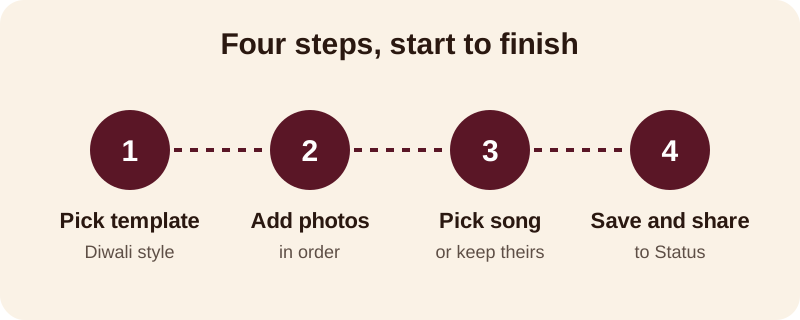
- Pick a Diwali template that matches the mood of your photos
- Add four to eight photos and arrange them in the order you want
- Keep the template's song, choose one from the free music library, or use your own song from your phone
- Type your wish, and add a name as name art if the video is for one person
- Save the video and share it straight to WhatsApp Status
Beat-sync is already switched on in most templates, so your photos change on the beat of the song without you having to time anything by hand. If you want the song's words on screen too, lyrics mode shows one line at a time as the track plays. You can always go back into the template afterwards and redo the photo order or wording before saving a final copy, so there is no pressure to get every detail right on the first pass.
Which photos and how many should you use?
Four to eight photos is usually the sweet spot for a Diwali wishes video — enough to feel like a proper celebration, few enough that nobody skips through it on WhatsApp Status before it finishes.
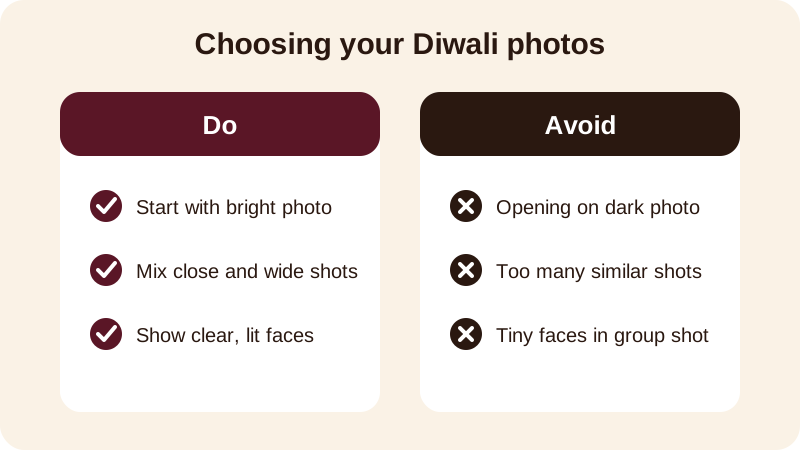
Choose photos that already say Diwali on their own: diyas lit on the balcony, the rangoli before anyone walks on it, the family in new clothes, the thali of mithai before it is shared. Put your brightest, clearest photo first, since that single frame decides whether someone watches the whole video or swipes past.
If you are choosing between a close-up and a wide family shot for the same moment, pick the close-up for the opening and save the wide shot for the middle. On a phone screen, a face you can actually recognise does more work than a whole room of people standing far away. Mix in at least one photo that shows the puja thali or diyas on their own — these quieter shots give the eye a rest between the family photos and make the short video feel more complete.
Which song should you pick for the video?
You can keep the song that comes with the Diwali template, pick a different track from Diya's free music library, or use a song already saved on your phone. Whichever you choose, beat-sync lines up the photo changes with the beat, so the video never looks out of time with the music.
For a video going to the whole family group, a warmer, classical or devotional-leaning track usually suits the occasion better than something fast. For close friends, a livelier song with a strong beat and beat-sync turned on works well, and lyrics mode can show the song's lines on screen if the track has festive words.
| Song source | Good for |
|---|---|
| Template's own song | Quick videos where you don't want to choose music |
| Free music library | Matching the mood — devotional, upbeat or gentle |
| Your own song from your phone | A track that means something to your family already |
For more on fitting music to your photos, see this guide on adding background music to photos, and this one on why a 9:16 shape works best for status and reels.
What should you write as your Diwali wish?
Keep it to one short line on screen — long paragraphs are hard to read while photos are changing. A few lines you can copy and adjust for your own family:
- Happy Diwali from all of us — may your home be full of light
- Shubh Deepavali — diyas, mithai and all of you
- Wishing you a safe, bright and prosperous Diwali
- Diwali ki hardik shubhkamnayein, from our family to yours
- May this Diwali bring more laughter, less worry, and lots of mithai
If the video is for one person — a parent, a sibling living away, or a close friend — put their name directly in the wish, or add it separately as glowing name art. A video with someone's name on it feels made for them, not forwarded to everyone on your contact list. See more ideas in this guide to a Diwali video with name, or browse full Diwali status video ideas and templates.
Can you share the same video on Instagram too?
Yes — every video Diya makes is 9:16, the same tall shape that WhatsApp Status, Instagram and most short-video feeds already expect, so you don't need to crop or redo anything for a second platform.
Save the video once from the app, then share it to WhatsApp Status first since it reaches family quickly, and post the same file to Instagram afterwards if you want a wider audience to see it. There's no separate version to make — the file works the same way everywhere it's posted.
What does the free version give you, and what does Premium add?
Your first 2 videos in Diya are free, and after that you get 1 free video every day, saved in 720p with a small "Diya" mark and a short "Made with Diya" end card. There are no ads either way, free or Premium.
Premium — available as Lifetime, Monthly or Annual — removes the mark and the end card and unlocks premium templates along with Full HD 1080p, and 4K on Android. Both tiers give you the same festival calendar, the same beat-sync, name art and lyrics mode, so you're never short of the tools, only the finishing touches.
Once Diwali is done, the same app covers the festivals around it too. Check the festival status videos calendar for Dhanteras, Govardhan Puja, Bhai Dooj and Chhath Puja, or browse more guides on the blog for every celebration through the year.
Frequently asked questions
Can I use my own song for a Diwali wishes video?
Yes. In Diya you can keep the music that comes with the Diwali template, choose a track from the free music library, or use a song already saved on your phone. Beat-sync then changes your photos on the beat of whichever song you pick, so the video still feels in time with the music.
How many photos should I use in a Diwali wishes video?
Four to eight photos is usually enough for a Diwali wishes video shared on WhatsApp Status. Pick moments that already feel festive — diyas, rangoli, new clothes, sweets — and put your brightest, clearest photo first so it grabs attention right away.
Can I add a name to the Diwali video?
Yes, Diya lets you add a typed name as glowing name art, so you can dedicate the video to one person or show your family's name on screen. This works well when the wish is meant for a specific parent, sibling or friend rather than a general greeting.
Is the Diwali wishes video free to make?
Your first 2 videos in Diya are free, and after that you get 1 free video every day, saved in 720p with a small Diya mark and a short end card. Premium removes the mark and end card and unlocks higher resolution and more templates.
Will the video fit WhatsApp Status and Instagram?
Every video Diya makes is 9:16, the tall shape that WhatsApp Status, Instagram and most short-video feeds use. You don't need to crop or resize anything — save the video from the app and share it directly.