Three ways to put a name on a Diwali video
People search for a “Happy Diwali video with name” for different reasons: to sign a wish to relatives, to greet customers from a shop, or to send a special one to one person. Diya covers all three.
1. A signature line (free)
Most Diwali templates have two text lines: the greeting and a smaller line under it for the sender. Type “Sharma Parivar”, “Riya & Kabir” or “Gupta Sweets” there and the name appears with the wish. The free From Our Family template is built around exactly this.
2. Name art (free in the editor)
In the editor, add a text layer and choose the Name art style. Diya draws the name as decorated lettering with a glow, a gradient fill, a flourish underneath and twinkling sparkles, and the name pops in when the video starts. It works on any template.
3. A name template (Premium)
The Diwali Parivar Name template is laid out for a big name: “Happy Diwali” on top and your family name in large name-art letters across the middle. It's a Premium template.
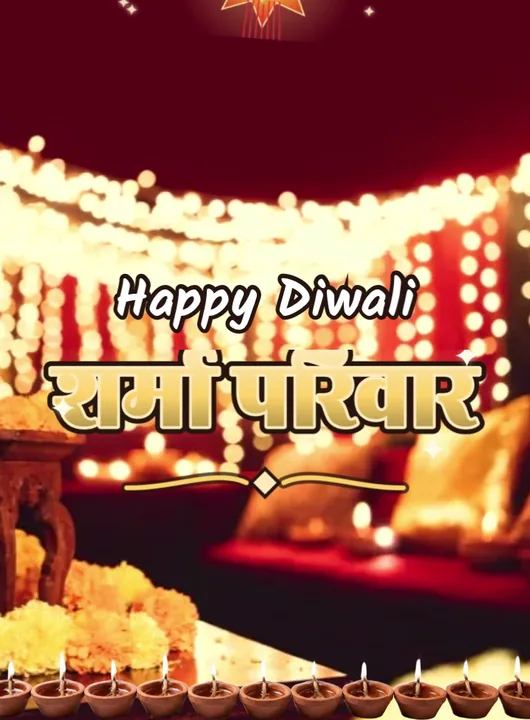
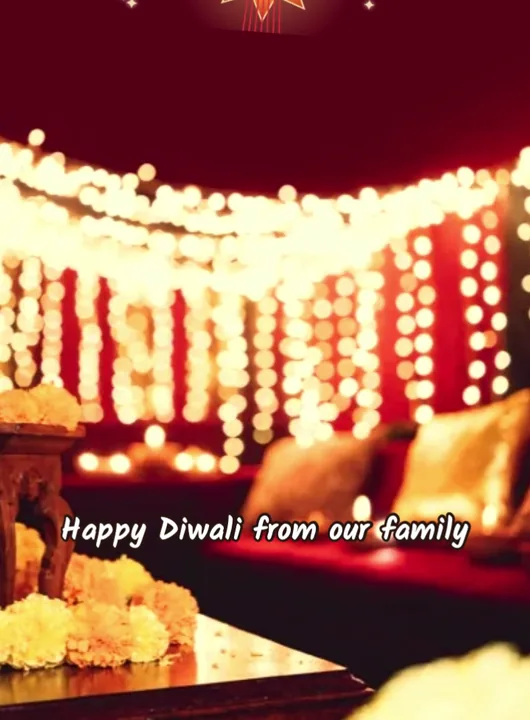
Template covers rendered by the app with sample photos and a sample name.
12 name wishes to copy
Swap in your own names. Keep the name part short — the name-art layer in the Diwali Parivar Name template fits about 24 characters, and short names glow bigger.
- Happy Diwali from the Sharma Parivar
- शुभ दीपावली — वर्मा परिवार की ओर से
- Happy Diwali, Maa & Papa — love, Riya
- Diwali greetings from Rohan, Neha & little Aarav
- Wishing you light and laughter — the Patel family
- दीपावली की शुभकामनाएँ — आपका अपना, अमित
- Happy Diwali, Dadi! Your diyas always shine brightest. — Kabir
- Thank you for shopping with us. Happy Diwali from Gupta Sweets
- To my best friend Sana — shine bright this Diwali!
- रौशनी का यह त्योहार आपके जीवन को रौशन करे — जोशी परिवार
- Happy Diwali & a bright new year — from Meera and Arjun
- With love and light, Priya — शुभ दीपावली
How to make a Happy Diwali video with your name
- Open a Diwali template. Install Diya from Google Play or the App Store and open it. In the templates, pick the Diwali category and tap a template to see its preview. For a name in the second line, any free Diwali template works — From Our Family is made for it. For your name as large glowing lettering, choose Diwali Parivar Name (Premium). Templates marked Premium need a subscription; the others are free to use.
- Add your photos. Choose photos from your gallery. Diwali templates take between 2 and 10 photos, depending on the template. If you pick fewer photos than the template has slots, Diya repeats them in a loop, so even two good photos make a full video.
- Type your wish and your name. On the Add your text screen, type your greeting and your name. Type the greeting in the first box and your name, surname or shop name in the second. Leave a line blank to skip it.
- Pick the music. Each template starts with a track from Diya's music library. Tap Choose music to switch (tracks with a lock are Premium). Keep Beat-sync on and the photos change on the beat. To use your own song, open Edit clips & timing, then music, then Import from phone — only use a song you have the right to share.
- Make the video. Tap Make video →. Diya builds it on your phone in a portrait 9:16 frame and saves it to your gallery. Free videos export in 720p with a small “Diya” mark and a short “Made with Diya” end card; Premium exports 1080p (4K on Android) with neither.
- Share it to WhatsApp Status. On the Your video is ready! screen, tap WhatsApp (on Android) or Export & share and pick WhatsApp, then choose My status and send. You can send the same file to family chats and groups too.
For name art: after step 3, open Edit clips & timing, tap Add text, type the name and choose the Name art style. Drag it where you want it on the preview, then continue with the music and export.
Tips for name videos
- Hindi or English? Write the name the way your family writes it. Diya's text works in both scripts, and the app itself runs in 11 languages.
- Shops and businesses. A name video with your shop name and a photo of the counter makes a good Diwali greeting to customers. On the free plan the video ends with a short “Made with Diya” card; Premium removes it if you'd rather end on your own name.
- One person, one video. For a parent or a grandparent, use photos of them and write their name in the greeting (“Happy Diwali, Nani”). It takes two minutes and gets saved, not scrolled past.
- Make it on the 7th. Free gives you one new video a day after your first two, so make the family video on Saturday 7 November and post it on Diwali morning, Sunday 8 November.
For general ideas and wishes without a name, see the Diwali status video guide.
Questions people ask
Can I add my name to a Diwali video for free?
Yes. Most free Diwali templates have a second text line for your name, and the Name art text style in the editor is free too. Only the Diwali Parivar Name template is Premium.
Can I write the name in Hindi?
Yes. You can type the greeting and the name in Hindi (Devanagari) or English, and the app runs in 11 Indian languages.
Will there be a watermark on my name video?
Free videos carry a small “Diya” mark in the corner and a short “Made with Diya” end card. Premium removes both and exports in 1080p (4K on Android).