Home › Blog › How to Make a Mother's Day Montage Video
How to Make a Mother's Day Montage Video
Last updated: October 25, 2026
A step-by-step guide to making a Mother's Day montage video in Diya using old and new photos, music, a short wish and mom's name as glowing name art.
Published
Quick answer
To make a mothers day montage video, pick a template in Diya, add old and new photos of your mom, type a short wish and her name, then add music. Diya builds a vertical video in about 3 minutes, ready for WhatsApp Status.
Key takeaways
- Mix old and recent photos of your mom, ordered oldest to newest, for a timeline feel
- Add her name as glowing name art instead of squeezing it into the wish line
- Pick a slower song from Diya's free music library or a song saved on your phone
- Free gives 2 videos free, then 1 a day in 720p with a small Diya mark; Premium adds 1080p or 4K on Android
- Photos are made into video right on your phone, never uploaded, no account needed
The simplest way to make a mothers day montage video is to pick a template in Diya, add a mix of old and recent photos of your mom, and type a short wish or her name over them.
What makes a good Mother's Day montage video?
A good montage does not try to show every photo you have of her. It picks a handful that actually mean something — a baby photo where she's holding you, a recent photo from a family lunch, a candid shot where she's laughing — and lets the music and a short wish do the rest.
Think of it as a small story, not a highlight reel. Three or four strong moments in a sensible order beat twenty similar photos that nobody has time to really look at on a phone screen. Once you add her name as glowing name art and one line of text, the video feels made for her specifically, not a generic Mother's Day post you downloaded.
How do you make it in Diya, step by step?
Diya turns your photos into a video right on your phone — nothing is ever uploaded — so the whole process from opening the app to saving the video usually takes about 3 minutes once your photos are ready.
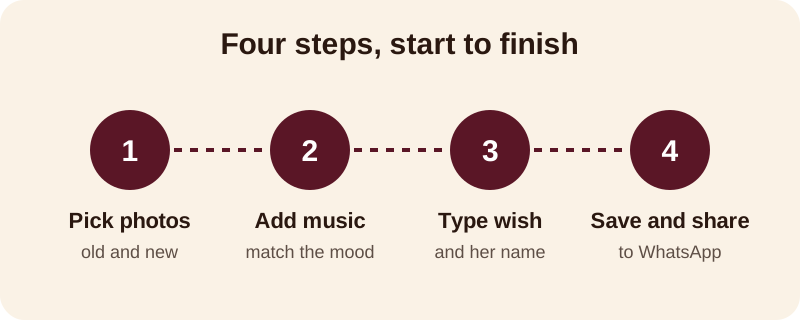
Here is the same flow in a bit more detail:
- Open Diya and choose a Mother's Day or family template
- Add your photos and arrange them in the order you want
- Type a short wish, and add her name as glowing name art
- Pick a song from the free music library, or choose one already saved on your phone
- Check the preview, then save and share the video to WhatsApp Status or your family group
Beat-sync changes the photos on the beat of the song automatically, so you don't have to time anything yourself. If you'd rather have your wish appear line by line with the music, switch on lyrics mode before you save.
If you'd rather start from a plainer photo-and-music video and build the montage feel yourself, see our guide on how to make a video from photos with music. On an Android phone and want the basics first, this guide on turning photos into a video on Android walks through that from scratch.
Which photos should you choose and in what order?
Pick photos that show different years and different sides of her, not just posed portraits. A photo of her cooking, gardening, holding a grandchild or simply laughing says more about who she is than a single formal photo ever will.
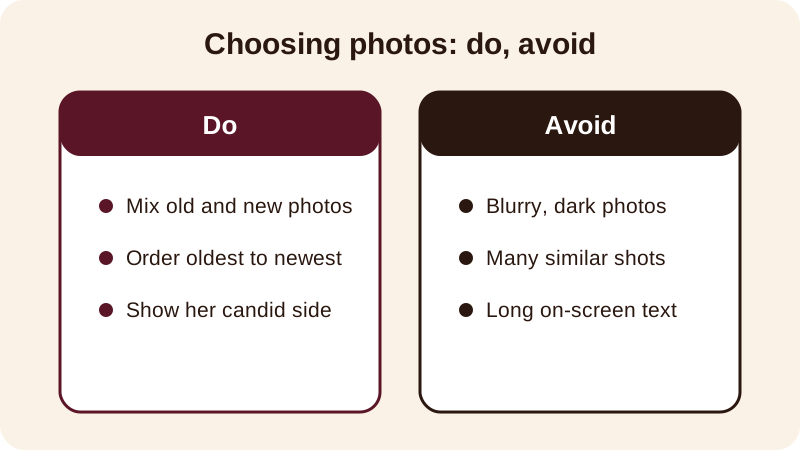
Order matters more than people think. Going roughly oldest to newest makes the montage feel like a small timeline of her life, instead of a random stack of pictures that confuses whoever is watching on their phone.
| Photo type | Why it helps |
|---|---|
| Childhood or old family photo | Gives the montage a "then" next to "now" |
| Recent close-up of her face | Reminds everyone why the video is for her |
| Candid, mid-laugh or mid-task | Feels true to who she is, not just posed |
| With grandchildren or family | Shows the role she plays today |
Four to six photos is usually enough for a Mother's Day WhatsApp Status video — people watch status videos quickly, so a few clear photos read better on a small screen than a long list of near-duplicates.
What music and words fit a Mother's Day video?
The song sets the mood before a single word appears on screen, so pick it before you lock in your photo order. A slower, warmer song usually suits a montage like this better than something upbeat, and you can use either a track from Diya's free music library or a song already saved on your phone that means something to your family.
For the wish itself, short beats long. One line reads easily on a phone screen; three lines usually does not. A few that work well, in English or mixed with Hindi words as your family writes:
- Happy Mother's Day, Mom — thank you for everything
- To the one who's always there — happy Mother's Day
- Love you, Mom, today and every day
- Thank you for raising us the way you did
- Maa, tujhe salaam — Happy Mother's Day
Type her name separately as name art rather than folding it into the wish line — it stands out on screen and gives the montage a title-card feel at the start or the end.
What does Free vs Premium give you for this video?
With Free, your first 2 videos are free, then you get 1 free video every day, exported in 720p with a small "Diya" mark and a short "Made with Diya" end card. That's enough to put together a complete Mother's Day montage — photos, music, wish and name art — and share it the same day.
Premium, available as Lifetime, Monthly or Annual, removes the mark and the end card and exports in 1080p, or 4K if you're on an Android phone. There are no ads either way, Free or Premium. The app is built for India, works the same way on Android and iPhone, and is available in 11 languages, so you can set it up in whichever language your family is most comfortable in.
Once you've made this one, the same steps work for Diwali, a birthday or an anniversary — Diya's festival calendar reminds you a few days before so you're never putting one together in a rush. Browse more photo video guides or see what else Diya can make before the day arrives.
Frequently asked questions
How long should a Mother's Day montage video be?
Keep it short — four to six photos is usually enough for a WhatsApp Status video. Diya builds the video to a vertical shape automatically, and the whole process of picking a template, adding photos and music takes about 3 minutes.
Can I use my own song for the video?
Yes. In Diya you can pick a song from the free music library or use one already saved on your phone — a song your mom hums at home often means more than a new one. Beat-sync lines the photos up to the song automatically.
How do I put mom's name on the video?
Diya lets you type her name as name art, a decorated lettering style that sits apart from your wish line, so it reads like a title at the start or end of the montage instead of being squeezed into the message.
Is the free version good enough for a Mother's Day video?
Yes — your first 2 videos are free, then you get 1 free video every day in 720p, with a small Diya mark and a short end card. Premium removes both and adds 1080p, or 4K on Android, if you want a sharper export.
Do I need to upload mom's photos anywhere?
No. Diya makes the video right on your phone — photos are never uploaded — and you don't need an account to use it. You pick the template, add photos and music, and save the finished video straight to your phone.