Home › Blog › Karwa Chauth Status Video for Husband
Karwa Chauth Status Video for Husband
Last updated: October 28, 2026
A step-by-step guide to making a personal Karwa Chauth status video for your husband in Diya, with wish ideas, photo picks and what the free tier gives you.
Published
Quick answer
To make a Karwa Chauth status for husband, pick a romantic template in Diya, add a couple photo, turn his name into glowing name art and type a short wish. Then share the 9:16 video to WhatsApp Status in about 3 minutes.
Key takeaways
- Use one couple photo, his name in name art and a one-line wish — simple beats long.
- Diya makes the video on your phone in about 3 minutes, ready for WhatsApp Status.
- Beat-sync matches photo changes to the music automatically, no editing needed.
- Your first 2 videos are free; after that it's 1 free video a day in 720p with a small Diya mark.
- Premium removes the mark and end card and unlocks Full HD and 4K on Android.
A Karwa Chauth status for husband works best as a short video — one couple photo, his name in glowing name art and a one-line wish, set to music. Diya puts all of this together on your phone in about 3 minutes, ready to share on WhatsApp Status as soon as you've seen the moon.
What should a Karwa Chauth status video for husband include?
Keep it simple — a photo, his name and one honest line say more than a long clip full of effects. The video should feel like it was made for him, not like a generic festival template with your names dropped in at the last minute.
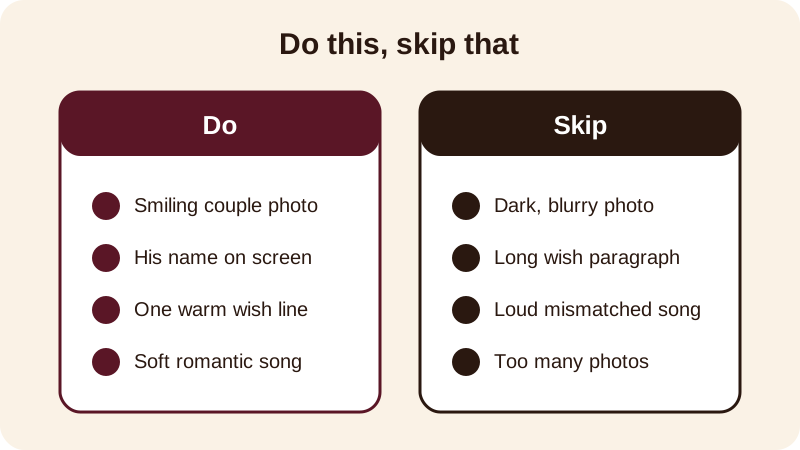
Start with a photo of the two of you, add his name as glowing name art, type one wish line, and let a soft song from the free music library play underneath. That combination is usually enough to make someone watch the whole status instead of swiping past.
If you keep a karwa chauth thali or a sargi plate ready, a photo of that can go in too, but it isn't necessary. Many couples simply use one happy photo together and let the name and the wish carry the rest.
How do you make it in Diya, step by step?
Making the video takes only a few taps, and the app does the harder part of fitting photos to the music and turning transitions on and off for you.
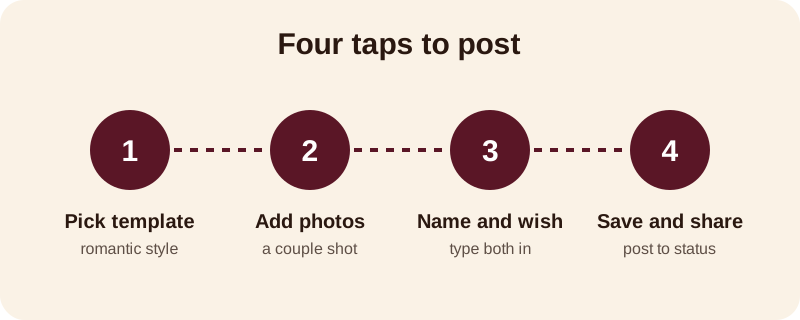
- Open Diya and pick a Karwa Chauth template, or any romantic template with soft colours.
- Add a couple photo — you can add two or three more if you want a short slideshow feel.
- Type your husband's name; Diya turns it into name art, in a style like Outline, Neon or Matte.
- Type your wish below the name, keeping it to one short line.
- Keep the template's song or pick another from the free music library — beat-sync changes the photo on the beat on its own.
- Check the preview, save the video, and share it straight to WhatsApp Status.
If you'd rather the words appear one at a time as the song plays, lyrics mode does that for you, so the wish reads out gently instead of sitting on screen the whole time.
What should you write as a Karwa Chauth wish for husband?
A short, personal line works better than a long paragraph on a status video — people watching on their phone read it in a glance, so make that glance count. A few lines you can use as they are, or change to suit the two of you:
- Happy Karwa Chauth, my husband — my fast is for you, every year
- Waiting for the moon, waiting to see you smile
- This fast is small next to everything you give me — Happy Karwa Chauth
- Karwa Chauth Mubarak to the one I pray for
Putting his actual name on screen, rather than just "husband," is what makes the video feel personal rather than generic — that's exactly what name art is for. If you want more ideas for a romantic video built around one person, the same approach works for a Valentine's Day video for him, since the structure — photo, name, one line — is the same.
Which photos work best for a Karwa Chauth status video?
One clear, well-lit photo beats five dim ones. A recent photo of the two of you together is the obvious first choice — from this year if you have one, or from a wedding or earlier Karwa Chauth if not. A solo photo of your husband, smiling and looking at the camera, also works well if you want the video to feel like it's addressed directly to him.
Avoid photos taken in low light or from far away — faces get lost on a small phone screen, and the name art you add on top won't read well against a busy or dark background. If you're adding more than one photo, order them so the clearest, happiest one plays first.
What does the free version give you?
Your first 2 videos in Diya are free. After that, you get 1 free video every day, exported in 720p with a small "Diya" mark and a short "Made with Diya" end card — there are no ads either way, free or Premium. If you want to remove the mark and end card, or export in Full HD, with 4K available on Android, Premium — available as Lifetime, Monthly or Annual — unlocks that along with more templates.
Whichever tier you use, the video stays on your phone the whole time — your photos are made into the video on the device and never uploaded, and you don't need an account to get started. Once Karwa Chauth is done, keep an eye on the festival status videos calendar so you're not scrambling the night before Bhai Dooj or Diwali either. And if you want to understand how the music and beat-sync actually line up with your photos, this guide on adding background music to photos walks through it in more detail.
Frequently asked questions
Can I add my husband's name to the Karwa Chauth video?
Yes. Type his name in Diya and it turns into decorated name art — you can pick a style like Outline, Neon or Matte. The name appears on screen along with your wish, so the video feels made just for him rather than a generic template.
What size should the video be for WhatsApp Status?
Diya makes every video in 9:16, the vertical shape WhatsApp Status and Instagram use, so you don't have to crop or resize anything yourself. Just add your photos and wish, and the video is already the right shape to post.
Can I use my own song for the video?
Yes. Besides Diya's free music library, you can pick a song saved on your phone. Beat-sync changes the photo in time with the song either way, and lyrics mode can show the words one line at a time if you want that style.
Is the Karwa Chauth video free to make?
Your first 2 videos in Diya are free, and after that you get 1 free video every day in 720p with a small Diya mark and end card. Premium removes both and adds Full HD and 4K export on Android, if you want a cleaner finish.
Do I need to upload my photos anywhere?
No. Diya makes the video on your phone, and your photos are never uploaded anywhere. You don't need an account either — open the app, pick a template and start adding your photos and wish right away.