Home › Blog › How to Make a Farewell Video for a Coworker
How to Make a Farewell Video for a Coworker
Last updated: October 10, 2026
A practical guide to gathering photos, picking music, and building a heartfelt farewell video for a departing coworker in Photo Video Maker.
Quick answer
If you're figuring out how to make a farewell video for a coworker, start with photos in order, add heartfelt messages, pick music that fits the mood, then build it in Photo Video Maker before their last day.
Key takeaways
- Collect photos from the whole team before you start, not just your own camera roll
- Order photos chronologically from first day to now for a natural story arc
- Pick music that matches the mood — upbeat for a promotion, warmer for a goodbye
- Keep text messages short so the video doesn't drag past the point people stay engaged
- Export at the size that matches where you'll share it, like a group chat or Instagram
If you're figuring out how to make a farewell video for a coworker, the short version is: gather their photos in order, mix in a few short messages from the team, pick music that fits the mood, and let an app time the whole thing for you. You can have something genuinely touching ready before their last day, even if you've never made a video before.
What should you include in a coworker's farewell video?
Think of it less as a goodbye speech and more as a highlight reel of someone's time on the team. The best farewell videos mix candid shots from team lunches, projects, and desk decorations with a few posed group photos, plus short written messages from people who worked with them.
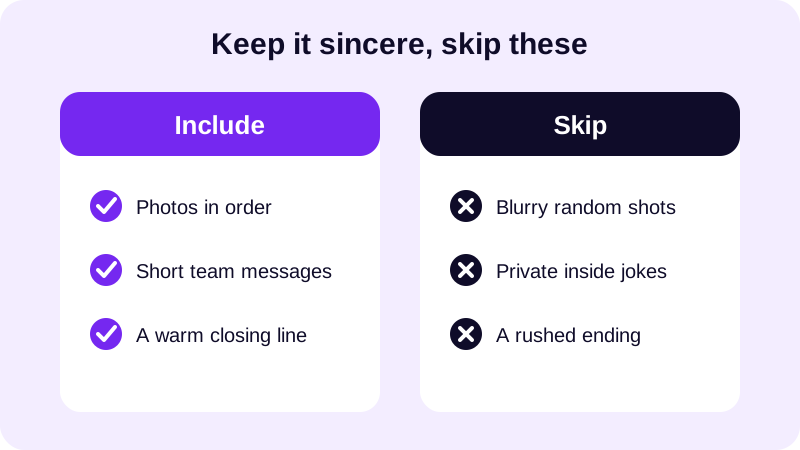
A few farewell video ideas for a coworker that tend to land well: a "day one" photo paired with a recent one, a caption pulling out a running joke only the team will get, and a final title card that simply says the team will miss them. If the person is moving to a new role rather than leaving entirely, you can lean more upbeat and less sentimental — the tone should match the occasion, not a template.
How do you actually put the video together?
Once you've got your photos and messages collected, building the video itself is the fast part. Open Photo Video Maker, select the photos you want to use, and drag and drop them into the order you want — most farewell videos work best moving roughly chronologically, from someone's earliest days on the team toward the present.
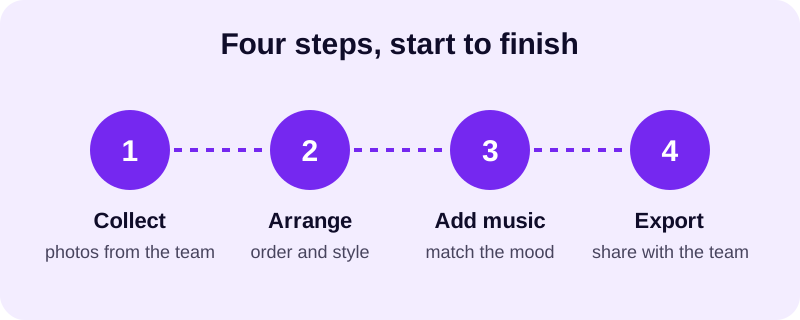
- Ask the team for photos and one-line messages a few days ahead of time.
- Open Photo Video Maker and select the photos from your gallery or phone's downloads folder.
- Drag and drop them into a rough timeline, earliest to most recent.
- Pick an aspect ratio that matches where you'll show it — widescreen for a shared screen, vertical if someone will post it to Instagram or TikTok afterward.
- Apply a filter and a frame that suits the tone, then preview the changes in real time before committing.
- Add text and stickers for names, dates, or a closing message.
- Drop in music from the built-in music library, or import a track the person actually likes.
- Export as an MP4 and share it in the group chat or play it at the send-off.
If you've already made a photo video before, this will feel familiar — the same drag-and-drop ordering and filter preview covered in how to make a video from photos with music applies here too. The main difference with a coworker's farewell video is tone: less polished and more personal usually wins.
What music fits a farewell video without feeling like a funeral?
Lean toward something warm but not heavy — a farewell video should feel like a toast, not a eulogy. A gentle, mid-tempo track works for most send-offs, while something more upbeat suits a coworker leaving for an exciting new job rather than simply moving on.
The music library inside the app has options organized by mood, which makes it easy to find something that fits without searching outside the app. If you want more background on finding a track that's safe to use even if the video gets posted publicly later, royalty free music for videos covers where to look and what to avoid.
What size should you export, and where do you share it?
The right export size depends entirely on where the video will actually be watched. A video playing on a laptop during an office lunch doesn't need the same treatment as a clip someone wants to repost to their own Instagram story afterward.
| Where you'll share it | Best aspect ratio | Why |
|---|---|---|
| WhatsApp group chat or email | Widescreen | Plays well on any screen, including laptops |
| Played on a shared office screen | Widescreen | Matches a standard display or projector |
| Reposted to Instagram or TikTok | Vertical | Fills the phone screen with no bars |
If someone on the team wants to post a shortened version later, the guides on the best aspect ratio for Instagram Reels walk through why vertical works better there, and the same logic applies if it ends up on YouTube Shorts. For the version you'll actually use at the send-off, export at whatever resolution looks sharp on the screen it'll play on — the app supports both 480p and 1080p, so you can pick based on where it's headed.
Once it's exported as an MP4, you can send it through WhatsApp, drop it into a shared drive, or hand someone a copy to keep. If this is your first time building a photo video on your phone at all, how to turn photos into a video on Android is a good starting point before you dive into a farewell video specifically. However you share it, the goal is simple: give the team a few minutes to actually feel how much the person will be missed, not just scroll past another slideshow.
Frequently asked questions
How many photos should a farewell video for a coworker have?
Somewhere between ten and twenty usually works best. Enough to show their time on the team without the video dragging on so long that people in the group chat stop watching before it ends.
What if coworkers are scattered across different teams or offices?
Create a shared folder or group chat and ask everyone to drop in a photo and a one-line message by a deadline. You'll end up with a wider mix of moments than you could gather on your own.
Should the video be funny or sentimental?
Most good farewell videos are a bit of both. Open with something light — a running joke or a funny photo — then move toward the warmer, more sincere messages near the end so it closes on a genuine note.
What's the best way to share the finished video with the team?
A group chat like WhatsApp works well for playing it during a send-off lunch, while exporting a vertical version is better if someone wants to post a clip to Instagram afterward.
Do I need any editing experience to make one?
No. Photo Video Maker is built around picking photos, dragging them into order, and tapping through filters and music with a real-time preview, so you can see exactly what you're getting before you export.