Home › Blog › How to Make a Nostalgic VHS Style Video
How to Make a Nostalgic VHS Style Video
Last updated: October 6, 2026
A step-by-step guide to turning ordinary phone photos into a nostalgic VHS style video using filters, frame overlays, transitions, and a softer export resolution in Photo Video Maker.
Quick answer
To make a nostalgic VHS style video, apply a warm grainy filter and a scan-line frame overlay to your photos, pick a soft transition, add a retro-leaning song, and export at a lower resolution for that worn camcorder look.
Key takeaways
- Layer a grainy filter with a scan-line frame overlay for authentic VHS texture
- Export at 480p instead of 1080p to soften the image like an old camcorder tape
- Pick a retro-leaning song from the music library to match the mood
- Add a corner date stamp with text and stickers for extra nostalgia
- Preview filters and frames in real time before committing to the final export
If you want to know how to make a nostalgic VHS style video, the short answer is: layer a warm, slightly washed-out filter with a scan-line frame overlay, pick a soft transition between photos, add a retro-leaning song, and export at a lower resolution so it feels like something pulled from an old camcorder tape. You can do all of this inside Photo Video Maker without any separate editing software.
What actually makes a video look like VHS?
A real VHS tape has a few telltale traits: slightly soft, grainy picture; warm, faded colors instead of punchy modern ones; faint horizontal lines running through the image; and a hint of motion blur between frames. None of that comes from one single setting — it's the combination that sells it.
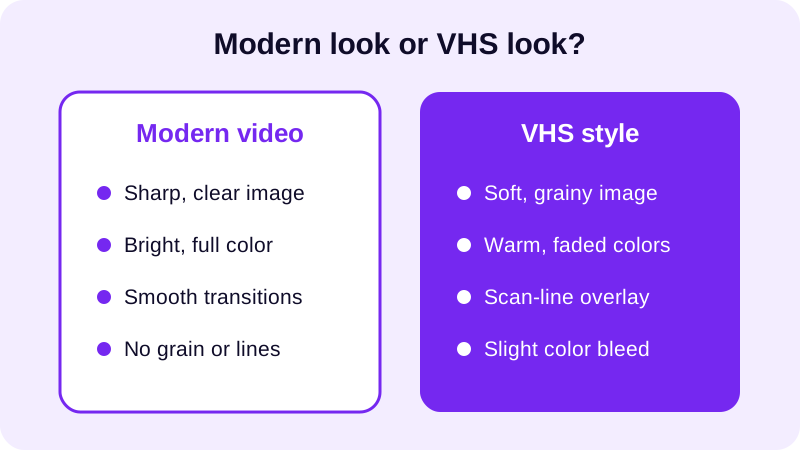
That's really all it is: a filter that warms and fades the color, a frame overlay that adds the scan lines and worn edges, and a transition style that feels slow and analog rather than snappy and digital. Once you know the three ingredients, building the effect is mostly about picking the right combination and checking it against your actual photos.
How do you build the VHS look in Photo Video Maker?
Once your photos are picked, the process is the same handful of steps every time, so it gets faster the second video you make.
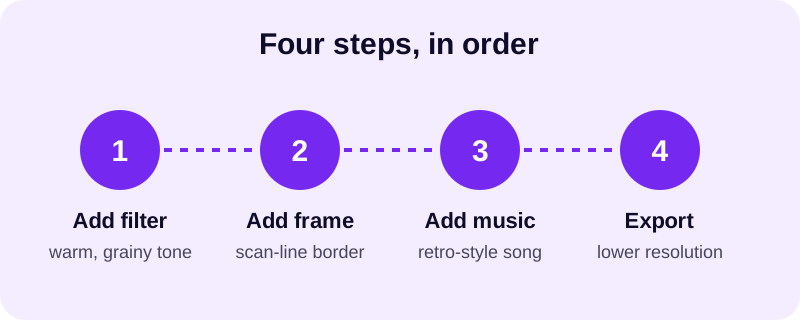
- Select your photos from the gallery and drag and drop them into the order you want the story to play out.
- Pick an aspect ratio that matches where you'll share it — for example, vertical for Instagram or TikTok, or a wider ratio for YouTube.
- Apply a warm, slightly faded filter from the 17+ filters available, checking the real-time preview to see how it sits on your actual photos.
- Add a frame overlay with a scan-line, static, or worn-edge look — among the 249 frame overlays, a handful are built specifically for a retro, analog feel.
- Choose a soft, simple transition between photos from the 8 transition effects, rather than a sharp or flashy one that breaks the illusion.
- Drop in a song from the music library that leans upbeat and a little lo-fi, or import your own if you already have one in mind.
- Optionally add a small, static date stamp in one corner using text and stickers, to mimic an old camcorder timestamp.
- Preview the whole thing, then export your finished MP4 video.
The frame overlay is really doing most of the work here. A filter alone can warm up the color, but it's the frame that adds the texture — the faint lines and worn border that make a clip read as "tape" instead of just "warm photo."
Which photos and songs fit the retro mood best?
Not every photo needs to be old for this to work, but a few choices make the effect land better. Photos with simple, warm backgrounds tend to hold a VHS filter more convincingly than busy, high-contrast shots, since the grain and faded color read more naturally against softer tones.
You can use JPG, PNG, or WebP photos straight from your phone — there's no need to dig up actual old prints or scan anything. If your photo set is a mix of old and new, put the genuinely older-looking photos earlier in the sequence and let the newer ones drift in later; it reads as a memory unfolding rather than a jumbled grab-bag. For music, something with a slightly lo-fi or retro character suits the mood far better than a crisp, modern pop track — browse the royalty free music guide if you want more background music options beyond the built-in library.
What export settings keep that old-camcorder feel once you share it?
Resolution matters more for this style than for most videos. A lower resolution export softens fine detail in a way that actually helps sell the VHS illusion, while a very sharp export can fight against the grain you just added.
| Export choice | Effect on the VHS look |
|---|---|
| 480p | Softer image that blends naturally with the grain and scan lines |
| 1080p | Crisper detail, which can make the grain look more like a visible layer than a true texture |
Either resolution exports fine as an MP4 that plays on Instagram, TikTok, WhatsApp, or YouTube, so pick based on how strong you want the retro effect to feel rather than worrying about compatibility. If you're posting to a vertical feed, check the aspect ratio guide for Reels before you export, since getting the ratio right the first time saves you from recropping a finished VHS-style video later.
Once you've built one nostalgic video this way, the next one goes faster — you'll already know which filter and frame combination you reach for. If you're still getting your photos organized first, the guide to turning gallery photos into a video on Android covers that starting point, and Photo Video Maker keeps your settings ready for the next one.
Frequently asked questions
Do I need actual old VHS footage to get this look?
No. You only need regular phone photos. The grainy, faded, scan-line look comes from the filter and frame overlay you apply, not from the source footage, so JPG or PNG photos from your gallery work fine.
Which filter works best for a VHS effect?
Look for a warm, slightly washed-out filter rather than a bright, high-contrast one. With 17+ filters available, try a few using the real-time preview and pick whichever makes your photos feel faded rather than sharp and modern.
Should I export in 480p or 1080p for a VHS look?
480p softens edges and adds a slightly blurry quality that reads as old tape. 1080p keeps detail crisp, which can fight the retro mood, so 480p is usually the better match for this specific style.
What kind of music fits a VHS style video?
Upbeat tracks with a slightly lo-fi or retro feel work best. Browse the music library inside the app, or see the royalty free music guide for more background music ideas if you want something specific.
Can I add a date stamp like an old camcorder?
Yes. Use text and stickers to drop a small date-style overlay in a corner of the frame. Keep it small and static through the clip so it reads like a built-in camcorder timestamp rather than a modern caption.